
Reporting timezone alignment and controls
Rainforest has released two related updates to how date and time data is handled across reporting components and export functionality.
-
On July 1st, 2026 all Report Components export functionality will begin to respect the timezone displayed within the reports.
-
Report Components will support the ability to configure the timezone to display date and time data in the reports and exports.
Export timezone alignment effective July 1st
Previously, all reporting components utilized your browser's local timezone to display and filter payment data, while exports returned all date-time values in UTC. This created a misalignment between the date-time data displayed in the component and the date-time data exported.
With this update, the timezone used for display and filtering in the reporting components will now be respected in the date-time data in exports. For example, if the report component is displaying Eastern Time (UTC-5), then the export will reflect Eastern Time as well.
If your downstream systems, reconciliation workflows, or reporting pipelines are built around exporting data directly from components and expecting UTC timestamps in the export, this change will affect those outputs. Review any pipelines or systems that consume exported data and currently expect UTC timestamps. Those outputs will now reflect the active timezone in the component.
Opt-in prior to July 1st
If you'd like to have your reporting and exports date-time timezones align prior to July 1st, please contact support to enable this feature.
New timezone controls in embedded components and API
Rainforest is introducing three ways to control the timezone used to display, filter, and export across all reporting components. All three controls work in tandem, with the following precedence order from highest to lowest:
Timezone selector (highest priority) > timezone component prop > browser locale (default)
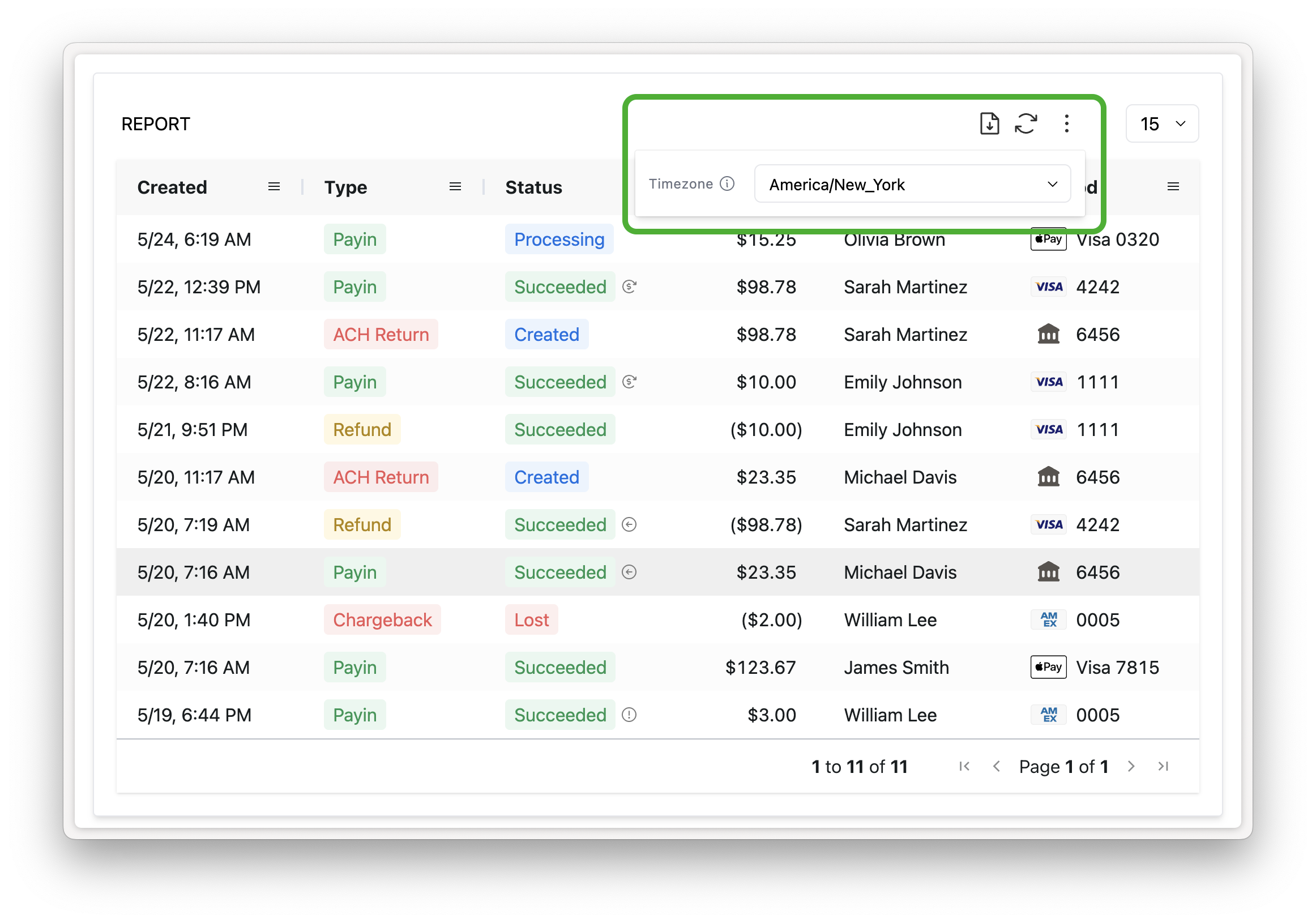
Timezone selector
Reporting components now support a timezone selector that allows users to select a timezone directly within the component. The selected timezone governs how dates and times are displayed in the report table, how the report data is filtered, and how data is exported. A selection made in the selector overrides both the browser locale default and the timezone prop set on the embedded component
Display the new settings button in your embedded report components by setting the prop show-timezone-selector.
<rainforest-payment-report
+	show-timezone-selector
	...
></rainforest-payment>
The timezone component prop
timezone component propPlatforms can set a timezone prop directly on any reporting component to explicitly declare the timezone used for display, filtering, and export. This overrides the browser locale default but will itself be overridden if the user selects a different timezone from the selector at runtime.
The timezone prop accepts IANA timezone identifiers (e.g., America/New_York, America/Chicago, America/Los_Angeles, etc.)
When neither the selector nor the timezone prop is set, components default to the browser's local timezone.
<rainforest-payment-report
+ timezone='America/New_York'
  ...
></rainforest-payment-report>
Supporting components
The following components now support the timezone prop:
- ACH Return Details
- Chargeback Details
- Chargeback Report
- Deposit Details
- Deposit Report
- Payin Details
- Payin Receipt
- Payment Report
- Refund Details
Timezone support in our API
For direct API queries, date-time filter values should continue to be passed as UTC RFC 3339 regardless of whether the timezone param is set.
The declared timezone param governs how response date-time values are returned. When timezone is not set, returned data will be presented in UTC with a Z zero offset, preserving existing behavior.