
Split payments across multiple merchants
Rainforest now supports distributing a single payin across multiple merchants.
Previously, amount splits only supported a single Platform split per payin. Now amount splits can be utilized to route funds to one or more merchants, with full control over how each merchant's allocation is handled on refunds and ACH returns.
How it works
Amount splits now support a new Merchant split type. Each merchant split routes a defined amount or rate-based allocation to the specified merchant. The remaining amount after all splits are applied will be allocated to the originating merchant on the payin.
In this example, a $100 payin on the originating Merchant A has a billing fee of 3% + $0.30, amount split of $5 to the platform, amount split of $4 to Merchant B, and amount split of $3 to Merchant C. The originating merchant, Merchant A, receives $84.70, which is the the net amount after the billing fee, platform split, and merchant splits were deducted.
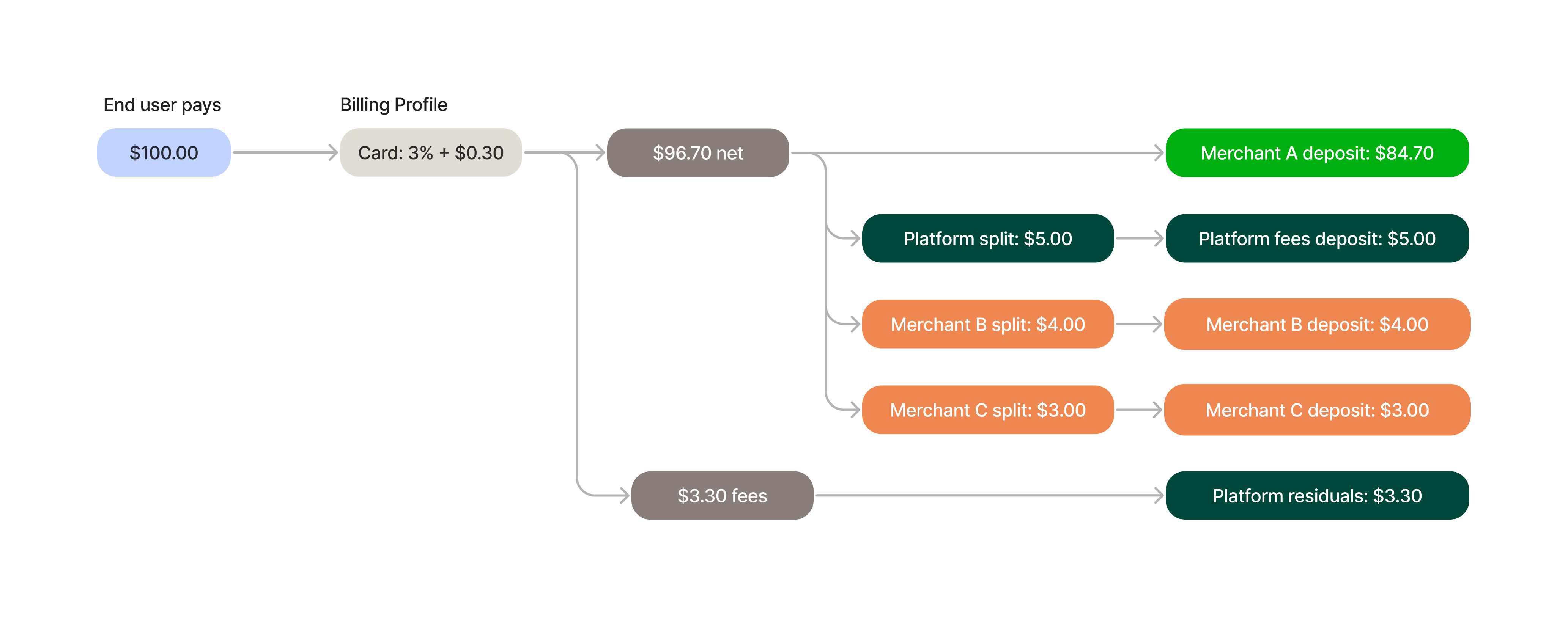
The amount splits defined on the payin config for this example would look like the following:
{
  // ...
	"merchant_id": "mid_A", // Originating Merchant
  "amount": 10000,
  "currency_code": "USD",
  "amount_splits": [
    {
      "type": "PLATFORM",
      "amount": 500,
      "currency_code": "USD"
    },
    {
      "type": "MERCHANT",
      "merchant_id": "mid_B", // Merchant B
      "amount": 400,
      "currency_code": "USD"
    },
		{
      "type": "MERCHANT",
      "merchant_id": "mid_C", // Merchant C
      "amount": 300,
      "currency_code": "USD"
    }
  ]
	// ...
}
Reversal configuration
As explained in the Reversal of payin billing fees and amount splits release, each amount split can now specify a reversal config that enables the split to be recovered on a refund for the full amount or an ACH return. If not enabled, the split receiver retains their allocation and the originating merchant absorbs the split amount of the refund.
Note, this configuration is not available for partial refunds or chargebacks.
When refunding via the Payment Report Component, the configuration defined on the Payin Config will be utilized for a full refund. For partial refunds, the originating merchant absorbs the full partial refund amount and all split receivers retain their allocations.
Refund amount splits
Instead of defining the reversal configuration of the amount splits on the payin config, Rainforest also supports defining the amount splits directly on the refund request via the API.
Amount splits defined on the refund request will override the reversal configuration defined on the payin config. This enables you to dynamically configure amount splits on a refund. This can be useful for partial refunds and determining the correct allocation or if the amount splits differ from the original payin amount splits.
For partial refunds, if no amount splits are provided, then the originating merchant absorbs the full partial refund amount and all split receivers retain their allocations.
Reporting
Payment Detail Components
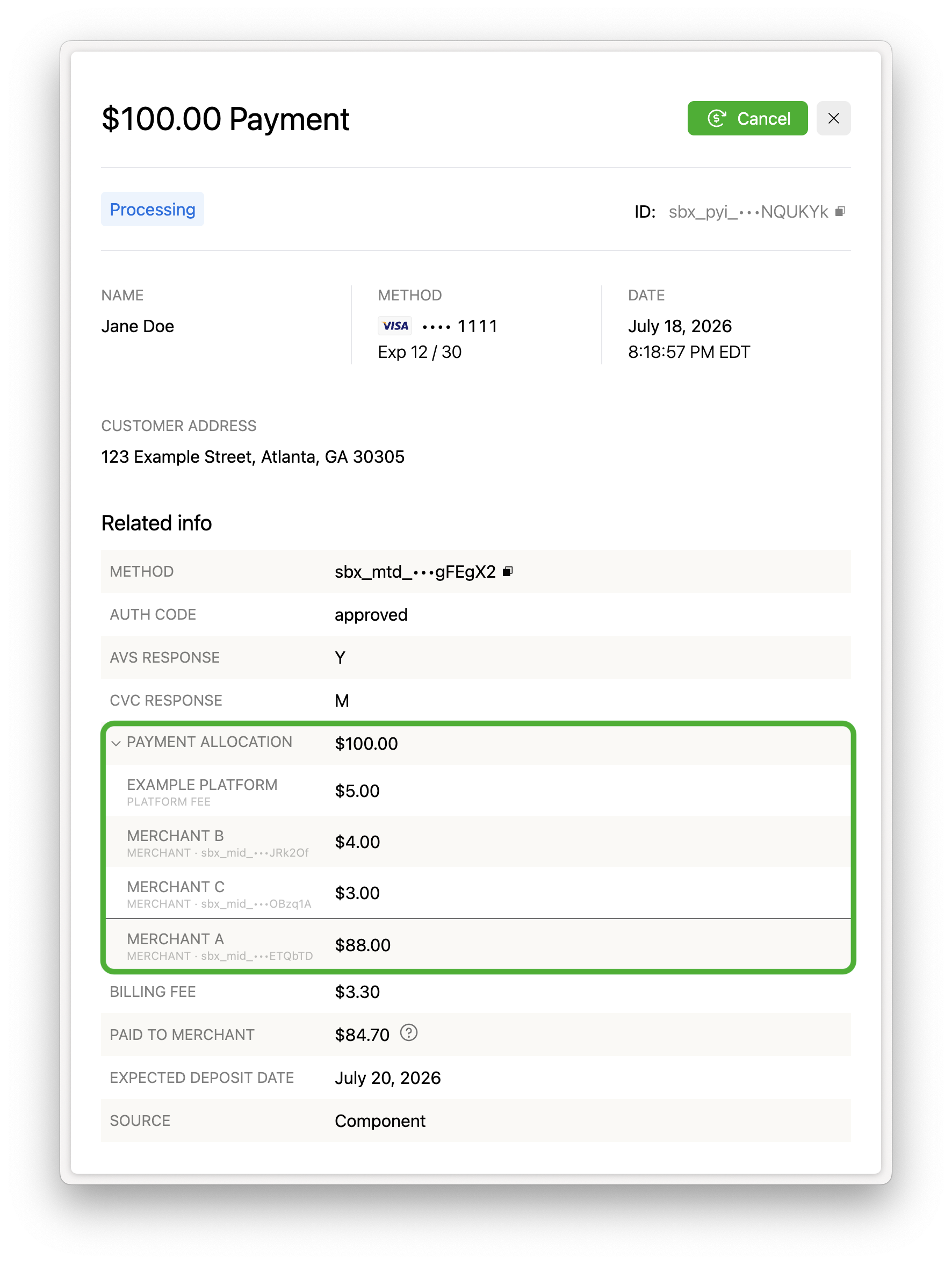
The Payment Details Components provide a Payment Allocation section within Related info that details the amount splits allocations between the originating merchant, the platform, and other merchants.
Deposit Report
Merchants who receive a Merchant split can see their allocation within the Deposit Report.
The payment splits will not appear within the Payment Report. Only the originating payin record appears in the Payment Report. The splits can be found within the Payin Details of the original payin.
How to enable
Platforms can integrate with multi-merchant splits by configuring the payin config with multiple amount splits. No other enablement or integration work is needed.
Reach out to your Platform Success Manager or support if you have any questions about configuring splits for your integration.