
Enable amount splits
Integrate amount splits to apply an additional platform fee
You can implement amount splits in three steps:
- Configure the payin to apply the amount splits
- Configure the reversal controls of the amount splits on refunds and ACH returns
- Configure the Deposit Report Component to show the amount split fees
Configure the payin
Amount splits support two split types, Platform and Merchant. Each split routes a defined amount or rate-based allocation to the platform or specified merchant. The remaining amount after all splits are applied will be allocated to the originating merchant on the payin.
Amount splits can be defined as a percentage rate and flat fee. Splits are in addition to the merchant billing fees.
Defining the amount split
You can utilize the rate, rate cap and amount fields to apply both a percentage and flat fee to the merchant.
Rate and rate cap
The amount split rate and rate cap are optional fields. The rate and rate cap will both default to 0 if not provided in the amount split configuration.
When rate and rate cap are set, they can only be set to the values of:
- Rate: >= 0% and <= 25%
- Rate Cap: >= $0 and <= $100,000
Additionally, the following validation must be met:
- If the rate is greater than 0%, then the rate cap must be greater than $0. For example, to bill a rate of 1% up to $100 set the rate cap value to 10000.
- If the rate is 0%, then the rate cap must be $0.
Amount, currency code, and type
The amount, currency code, and type fields are required.
- Amount: >= $0 and <= less than the payin amount
- Currency Code:
USD - Type:
PLATFORM,MERCHANT
Merchant
The merchant ID field is required for Merchant amount splits. The following validation must be met:
- Cannot match the
merchant_idof the originating merchant of the payin - Cannot be duplicated within the same amount splits
Payin config request
The platform amount split can be configured on the create payin config request:
  {
    "merchant_id": "{{merchant_id}}",
    "idempotency_key": "{{idempotency_key}}",
    "amount": 10000,
    "currency_code": "USD",
+   "amount_splits": [
+     {
+       "rate": 3000, // in per cent mille (1 PCM = 0.001%)
+       "rate_cap": 1000, // in minor units
+       "amount": 500, // in minor units
+       "currency_code": "USD",
+       "type": "PLATFORM"
+     }
+   ]
  }
In this example, the total amount split for this $100 payin would be $8 ($3 from the rate, $5 from the flat fee amount). This would result in $92 (minus billing fees) being deposited to the merchant and $8 being deposited to the platform.
To define only a rate, set the amount to $0:
  {
    "merchant_id": "{{merchant_id}}",
    "idempotency_key": "{{idempotency_key}}",
    "amount": 10000,
    "currency_code": "USD",
+   "amount_splits": [
+     {
+       "rate": 3000, // in per cent mille (1 PCM = 0.001%)
+       "rate_cap": 1000, // in minor units
+       "amount": 0, // in minor units
+       "currency_code": "USD",
+       "type": "PLATFORM"
+     }
+   ]
  }
To define only a flat fee amount, omit the rate and rate cap fields.
  {
    "merchant_id": "{{merchant_id}}",
    "idempotency_key": "{{idempotency_key}}",
    "amount": 10000,
    "currency_code": "USD",
+   "amount_splits": [
+     {
+       "amount": 500, // in minor units
+       "currency_code": "USD",
+       "type": "PLATFORM"
+     }
+   ]
  }
Auth and capture
When utilizing the two-step authorization and capture payment flow, you can define an amount split on capture payin. This will override the amount split configuration on the payin config.
Reversal configuration
Reversal config on payins
Each amount split can specify a reversal config via the amount_split_reversal_config field that enables the split to be recovered on a refund for the full amount or an ACH return.
The reversal config includes two controls:
on_full_refund- determines whether this amount split is reversed when a refund for the full amount is processed on the payin.on_ach_return- determines whether this amount split is reversed when an ACH return is processed on the payin.
When these controls are true, the amount split receiver's allocation is pulled back on the refund or ACH return. When false, the amount split receiver retains their allocation and the originating merchant absorbs this amount of the refund or ACH return.
To define a platform fee that should be returned to the originating merchant and pulled back from the platform on a full refund and ACH return, set the amount_split_reversal_config fields to true:
  {
    "merchant_id": "{{merchant_id}}",
    "idempotency_key": "{{idempotency_key}}",
    "amount": 10000,
    "currency_code": "USD",
    "amount_splits": [
      {
        "rate": 3000, // in per cent mille (1 PCM = 0.001%)
        "rate_cap": 1000, // in minor units
        "amount": 500, // in minor units
        "currency_code": "USD",
        "type": "PLATFORM",
+       "amount_split_reversal_config": {
+         "on_full_refund": true,
+         "on_ach_return": true
+       }
      }
    ]
  }
Amount splits on refunds
Amount splits can be defined directly on the refund via the API to dynamically configure how the refund should be allocated and debited from each split receiver.
Defining the amount splits on the refund will override the reversal configuration defined on the originating payin.
  {
    "merchant_id": "mid_123",
    "idempotency_key": "{{idempotency_key}}",
    "amount": 5000,
    "currency_code": "USD",
+   "amount_splits": [
+     {
+       "rate": 0, // in per cent mille (1 PCM = 0.001%)
+       "rate_cap": 0, // in minor units
+       "amount": 500, // in minor units
+       "currency_code": "USD",
+       "type": "MERCHANT"
+       "merchant_id": "mid_456"
+     }
+   ]
  }
In this example, a $50 refund is processed with a merchant split of $5 on mid_456. This would result in debiting the originating merchant, mid_123, $45, and debiting the split merchant, mid_456, $5 when processing the $50 refund.
Configure deposit report
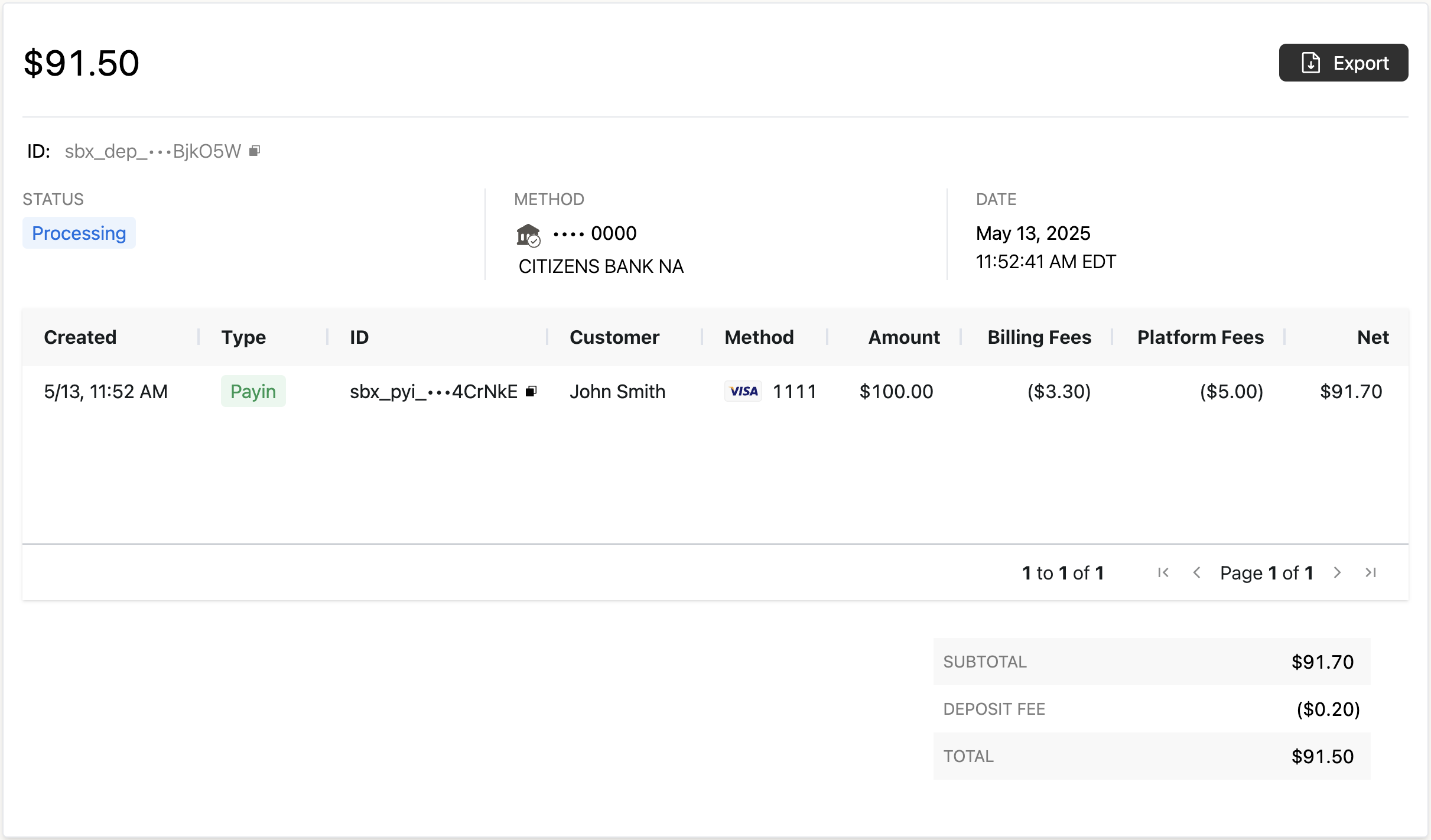
When embedding the Deposit Report Component, you should display the amount splits to your merchant by customizing the activity columns in the integrated Deposit Details Component.
See the activity column configuration of the deposit report component guide for details on how to customize the columns. The following column should be added:
{
    "name": "Platform Fees",
    "type": "builtin",
    "value": "split_remainder_amount"
}
The name of the column can be defined to provide context to your merchant on the explanation of the amount splits.
Updated 3 months ago