
Enable Tap to Phone iOS SDK
Enable Tap to Phone payments on your platform's iOS application
The Tap to Phone SDK is currently in Beta and only available for iOS.
Rainforest reserves the right to introduce breaking changes during this period. You will be notified of any updates prior to the release.
Please contact Rainforest support or your Platform Success Manager for more information on this feature.
Feature requirements🔐 Rainforest must enable the platform to access this feature
💲 Billing fees associated to this feature
Implement Tap to Phone SDK into your platform's iOS application with five steps:
- Enable Tap to Phone on your integration with Rainforest
- Configure your application with Apple pre-requisites
- Create device registrations for each device your application will process payments on
- Integrate the Rainforest SDK Tap to Phone payment flow
- Configure the Deposit Report Component to show the billing details
Enable Tap to Phone
Please reach out to your Platform Success Manager or support to enable this feature. Rainforest will provide:
- The Rainforest iOS SDK download instructions
- A sample application if your platform utilizes React Native, Expo, or Flutter
Apple pre-requisites
There are a few permissions and app-level configuration that needs to be set within your mobile application before trying to interact with the SDK in code.
Entitlements

NFC permission entitlement
The NFC entitlement must be included to enable the Tap to Phone feature.
Near Field Communication Tag Reader Session Format
- Near Field Communication Tag Reading Session Format = Tag-Specific Data Protocol (TAG)
Payment Acceptance Entitlement
Apple Approval of Entitlement
You should request the Tap to Pay on iPhone entitlement with Apple as soon as possible. Even if you do not plan to complete development immediately. This integration cannot be done until Apple has approved your entitlement, which can take time.
To configure an iOS app for Tap to Phone, the Apple Developer provisioning profile must be enabled with the Tap to Pay on iPhone entitlement. Details on requesting and configuring this entitlement from Apple can be found in Apple’s developer documentation. Once Apple approves the entitlement, it can be enabled in your application's entitlements file:
com.apple.developer.proximity-reader.payment.acceptance = YESInformation property list
The following values are set through Info.plist variables:

Apple developer account ID
Set PRODUCT_TEAM_IDENTIFIER equal to your platform's Apple Developer Account ID.
Location permissions
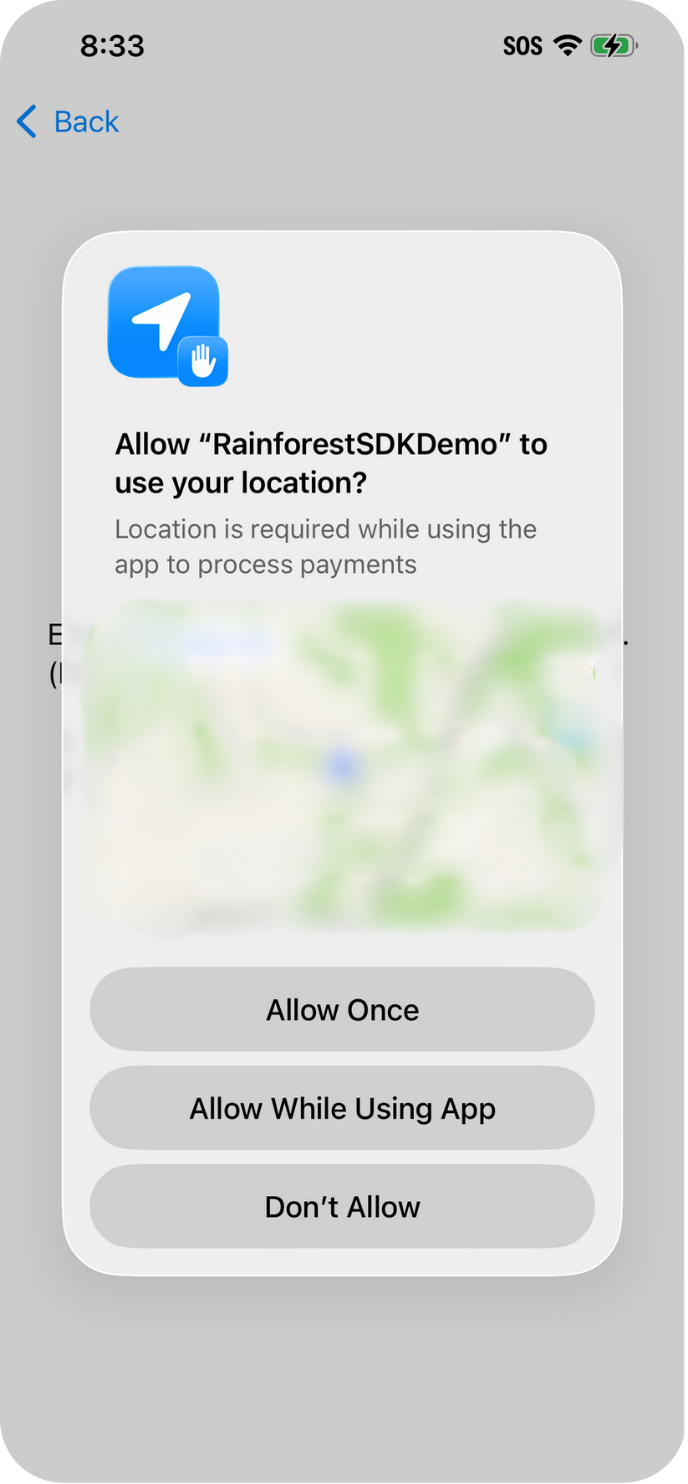
Location permissions must be enabled by the application due Tap to Phone being available is select countries and regions. This will prompt the end user to allow their device's location to be shared when using the application. If they do not allow their location to be shared, then the Tap to Phone feature will not work.
Privacy - Location When In Use Usage Description = Location is required while using the app to process paymentsThe text for this field appears in the UI to the end user for them to share their location. Set it to something that let's the end user know you need access to their location to process Tap to Phone payments through the device.
Device Authentication
iOS Tap to Phone will not work without device authentication.
The device must have iCloud authentication enabled. This authentication can be in the form of a passcode, FaceID or TouchID.
Device registration
Each device with your platform's application must be registered as a Rainforest device registration.
Devices must be registered to a merchant in order to process payments, which is completed via the create device registration endpoint. You'll need to pass:
registration_code: set toIOS_SDKmerchant_id: the merchant to process payments on with the devicedevice_name: the friendly name of the device, this will only appear in the Rainforest API and not in any Tap to Phone flows
{
    "registration_code": "IOS_SDK",
    "merchant_id": "sbx_mid_example",
    "device_name": "Example device"
}
The Device Registration ID will be utilized when presenting a payin and initiating the Tap to Phone payment flow through the Rainforest SDK. You should create a Rainforest Device Registration when your application is downloaded to the iOS device and represents that specific iOS device.
Each device that will utilize the Rainforest SDK for Tap to Phone must have it's own unique Rainforest Device Registration ID and cannot be shared across devices. Only one payin can be presented at a time on a Rainforest Device Registration.
Session permissions
Create a session to grant the SDK permissions to process a payin with the permission group payment_sdk and pass the session_key into the Rainforest SDK.
"statements": [
  {
    "permissions": ["group#payment_sdk"],
    "constraints": {
      "merchant": {
        "merchant_id": "REPLACE_ME"
      }
    }
  }
]
Rainforest iOS SDK
Rainforest will provide you with a ZIP file that contains the Rainforest SDK and its dependencies. Once downloaded, unzip the file. Move this directory to a place where you can reference it's location when adding dependencies to your application.
Versioning
The publicly available version will be an evergreen build during the beta phase. Once out of beta, the SDK version will follow semantic versioning principles.
Add dependencies to app
Framework dependencies are added through the applications settings, following these steps:
- In Xcode navigator choose your project to open the settings views.
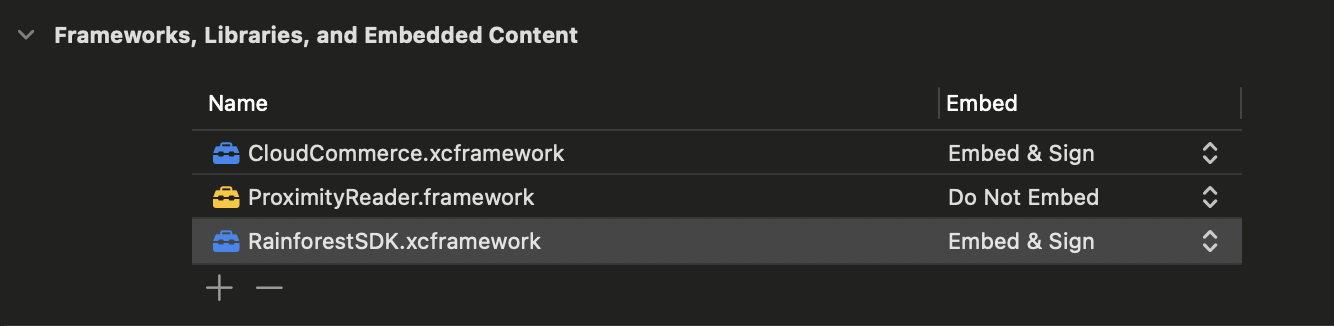
- Select your application target > General > Frameworks, Libraries and Embedded Content
- Click '+' icon to add three dependencies
RainforestSDK- "Add Other" > selectRainforestSDK.xcframeworkfrom the unzipped file provided by Rainforest. Set the "Embed" value to "Embed & Sign".RainforestSDKdependency package - "Add Other" > selectCloudCommerce.xcframeworkfrom the unzipped file provided by Rainforest. Set the "Embed" value to "Embed & Sign".ProximityReader- Search for "proximity" and select "Apple SDKs > ProximityReader.framework"
- "Embed & Sign" all necessary dependencies
Swift package manager
If you are using the Swift package manager version of the Rainforest iOS SDK, follow the instructions provided by Rainforest to add dependencies to your app.
In-app setup user flow
It can be beneficial to provide a setup flow for your users that is separate from your payment flow. This setup flow should:
- Check that iPhone GPS permissions are enabled for your app
- Check that iPhone device authentication is enabled (passcode, FaceID or TouchID)
- Call the prepare method of the SDK to perform its initial preparation step. The very first
preparecall requires some extra software provisioning that can take more time to complete than any subsequentpreparecalls
If these steps are not completed ahead of taking a payment, errors will occur when trying to accept payments.
Import the SDK
Once the Rainforest SDK is added as an dependency, you can import it into your code:
import RainforestSDKSDK reference
The Rainforest iOS SDK exposes a generic interface through the RainforestPay namespace for initializing the Tap to Phone functionality and presenting a payin through the Tap to Phone flow.
To initialize the SDK, call RainforestPay.TapToPhone
Initialize the SDK
RainforestPay.TapToPhone
Initializes the Rainforest iOS SDK on the provided environment and valid session key. Call this on the initialization of your application or when the session key needs to be refreshed.
Declaration
static public func TapToPhone(_ environment: Environment, sessionKey: String)Parameters
| Parameter | Description |
|---|---|
environment | The Rainforest environment the SDK will integrate with. Possible values are sandbox or production. |
sessionKey | The session_key returned by the create session request. |
Setup device for Tap to Phone
.setup
Request needed permissions and setup device for accepting Tap to Phone payments. This should be used as part of a “setup” screen in your application that is out the side flow of normal payment acceptance.
There is no guarantee that the user does not disable the required permissions after the setup. If they do, related errors will be thrown in the Tap to Phone flow.
Declaration
func setup(deviceRegistrationId: String) async throws
Parameters
| Parameter | Description |
|---|---|
deviceRegistrationId | The device registration ID for the device your application is on. |
Throws
| Throws | Description |
|---|---|
RainforestError.error | Throws a Rainforest error, if applicable. |
Initialize Tap to Phone
.prepare
Configures the device to allow Tap to Phone payments. Call this each time your end user enters the payment flow to create a short lived reader session on the application. The function will complete once the preparation is done.
The first time this is run on a device, the proximity reader requires additional configuration that runs behind-the-scenes. This will cause the prepare function to take a little longer and it is recommended to call this on the initial loading of your application in the background. Therefore, when the end user enters the payment flow, the subsequent calls to .prepare will be quicker.
Declaration
func prepare(deviceRegistrationId: String) async throwsParameters
| Parameter | Description |
|---|---|
deviceRegistrationId | The device registration ID for the device your application is on. |
Throws
| Throws | Description |
|---|---|
RainforestError.error | Throws a Rainforest error, if applicable. |
Present a payin
.presentPayin
Presents a Tap to Phone payin to the end user. Successful presentation will result in the Apple Tap to Phone UI displaying to the end user. The end user can tap their NFC compatible payment method (card or mobile wallet) to process the payin.
Prior to presenting a payin, create a payin config to define the amount, merchant, and other details. Creating the payin config should be done by your backend and outside of the scope of your session.
To support accepting a tip through the SDK, create a payin config with device tip options. The tip presets will not be displayed through the SDK integration, but are still required to provide the device tip options to verify that a tip can be passed into the SDK. You should display a UI to your end user to collect the tip amount, and then pass the tip amount through the PresentPayinOptions. Rainforest calculates the new total amount to process, including the tip, before displaying the Tap to Phone screen to the end user.
Declaration
func presentPayin(deviceRegistrationId: String, payinConfigId: String) async throws -> PaymentResponse

func presentPayin(payinConfigId: String, options: PresentPayinOptions) async throws -> PaymentResponsepublic struct PaymentResponse: {
public var status: RainforestResponseStatus
public var payin: PayinData
}public enum RainforestResponseStatus: String, Decodable, Sendable {
case success = "SUCCESS"
case failure = "FAILURE"
}public struct PayinData: Codable, Sendable {
public let payinId: String
public let status: String
public let amount: Intpublic struct PresentPayinOptions {
public let tip: Int? // minor units, must be non-negative; nil/0 = no tip
public init(tip: Int? = nil)
}Parameters
| Parameter | Description |
|---|---|
payinConfigId | The payin config ID to present on the device. |
deviceRegistrationId | The device registration ID of the device to present the payin on. |
Response
| Throws | Description |
|---|---|
status | The status of the request. Possible values are SUCCESS or FAILURE |
payin | The payin object that will return the payinId, status, and amount. Values match the response from the get payin endpoint. |
Throws
| Throws | Description |
|---|---|
RainforestError.error | Throws a Rainforest error, if applicable. |
Cancel the presented payin
.cancelPresented
Cancel the currently presented payin on the device. Call this if you attempt to present a payin on a device and receive back the error DEVICE_IN_USE, but a payin is not being presented on the device. This may occur if the end user closed out of the application during the Tap to Phone payment flow or the device shuts down. Calling .cancelPresented will reset the device and allow a new payin to be presented.
Rainforest will automatically handle canceling the payin if the end user cancels the payin flow directly on the Tap to Phone UI or the payin has been presented for more than 5 minutes.
Declaration
func cancelPresented(deviceRegistrationId: String) async throwsParameters
| Parameter | Description |
|---|---|
deviceRegistrationId | The device registration ID for the device the payin is presented on. |
Throws
| Throws | Description |
|---|---|
RainforestError.error | Throws a Rainforest error, if applicable. |
Resume the app
.resume
Resumes the reader session of the application. This is necessary if the application goes into the background for any reason. You must call .resume prior to attempting to present another payin.
You may also call .prepare to create a new reader session. However, if the reader session is still valid, then calling .resume will be faster than creating a new reader session.
Declaration
func resume(deviceRegistrationId: String) async throwsParameters
| Parameter | Description |
|---|---|
deviceRegistrationId | The device registration ID for the device your application is on. |
Throws
| Throws | Description |
|---|---|
RainforestError.error | Throws a Rainforest error, if applicable. |
SDK errors
The following errors can be thrown
Evaluate the error code and message field for details about the error.
| Code | Description |
|---|---|
API_ERROR | Error generated from requests to the Rainforest API. See HTTP request logs in the Rainforest Platform Portal for details. |
APP_CONFIGURATION_ERROR | The application is misconfigured. See error message for details. |
AUTHORIZATION_ERROR | Prepared session has expired. Call prepare again. |
CARD_READER_ERROR | There was an error with communication between the device and card. UI should allow the user to re-present the payin again. If not, it is safe to present the payinConfigId. |
CARD_READER_SESSION_ERROR | There is an error with the device reader session. You should call prepare to generate new reader session. |
DEVICE_IN_USE | Device is currently presenting a payin and cannot present another payin. This will timeout after 5 minutes, or you can call the cancelPresented function to cancel the currently presented payin. |
INVALID_PAYIN_CONFIG_ERROR | Something is wrong with the provided payin config ID. It's likely there is already a successful payin for the config. See HTTP request logs in the Rainforest Platform Portal for details. |
LOCATION_ERROR | The required location permissions have not been configured in the app or granted by the end user. |
MERCHANT_ERROR | There was an issue with setting up the merchant. Contact support for help. |
MISSING_PERMISSION_ERROR | Proper location permissions or device authentication have not been granted by the user. |
NOT_READY_ERROR | prepare must be called before attempting to take Tap to Phone payments. |
NOT_SUPPORTED_ERROR | The device does not support Tap to Phone. |
UKNOWN_ERROR | Unforeseen error. Check the message for more detail or contact Rainforest support for help. |
Code examples
Swift
import RainforestSDK


/*
Initialize the SDK instance during application normal "bootstrapping" lifecycle. You should maintain a reference to the SDK if not instantiated in the same scope.
*/
let tapSDK = RainforestPay.TapToPhone(.sandbox, sessionKey: "sbx_session_*****")

// ...

/*
  Setup the device with Tap to Phone permissions. Called as an initial setup step outside the payment flow
 */
do {
  try await tapSDK.setup(
    deviceRegistrationId: "sbx_dvc_******"
  )
} catch {
  // handle setup error
}

// ...

/*
Prepare the SDK with Tap to Phone functionality early in the payment lifecycle.
*/
do {
	try await tapSDK.prepare(
    deviceRegistrationId: "sbx_dvc_******"
  )
} catch {
	// handle prepare error
}

// ...

/*
Present the payin on the device to initiate the Tap to Phone payment flow.
*/
do {
  try await tapSDK.presentPayin(
		payinConfigId: "sbx_cfg_******,
    deviceRegistrationId: "sbx_dvc_******"
  )
} catch {
 	// handle present error
}
React Native
If your application is written in React Native, then you must create a bridge between your application and Rainforest's SDK written in Swift. Rainforest will provide a sample application demonstrating how to complete this integration.
Expo
If your application is written in Expo, then you must create a bridge between your application and Rainforest's SDK written in Swift. Rainforest will provide a sample application demonstrating how to complete this integration.
Flutter
If your application is written in Flutter, then you must create a bridge between your application and Rainforest's SDK written in Swift. Rainforest will provide a sample application demonstrating how to complete this integration.
Sandbox simulation
Sandbox Apple test account
This account must be used to log into iCloud on the device. Using the "Sandbox Apple Account" in Developer options will not work. It must be logged into as the main Apple/iCloud account on the device.
Testing Tap to Phone in iOS requires a sandbox user in your Apple account. You can create a sandbox Apple account in 4 steps:
- Log into your account at https://developer.apple.com/account.
- Navigate to Users & Access. Then select Sandbox.
- Follow the steps to create a new user.
- Use the new sandbox user's credentials to log into the iCloud account on your test device.
When moving to production, you must switch to a live production iCloud account. The SDK will throw an error if you attempt to use a sandbox user in production.
Device interactions
On Sandbox, Rainforest will not automatically process the presented payin on the device through the Tap to Phone payment flow. The end user will complete the Tap to Phone interaction, but you will need to simulate the presentation of the payin on the device. This allows you to simulate the expected payin status and various cards and decline flows.
Once the payin has been presented on the device, the next step is asynchronous because you are waiting for the interaction to complete on the device.
You can simulate various scenarios with the simulate device interaction endpoint. For example, to test the case where a Visa card is tapped on the device and then successfully processes a payment, you would pass the event PRESENTED and the card VISA_SUCCESS:
{
    "event": "PRESENTED",
    "card": "VISA_SUCCESS"
}
Configure deposit report for billing
Tap to Phone does incur an additional billing fee. If you're passing the fee onto the merchant, then the deposit will include a billing adjustment.
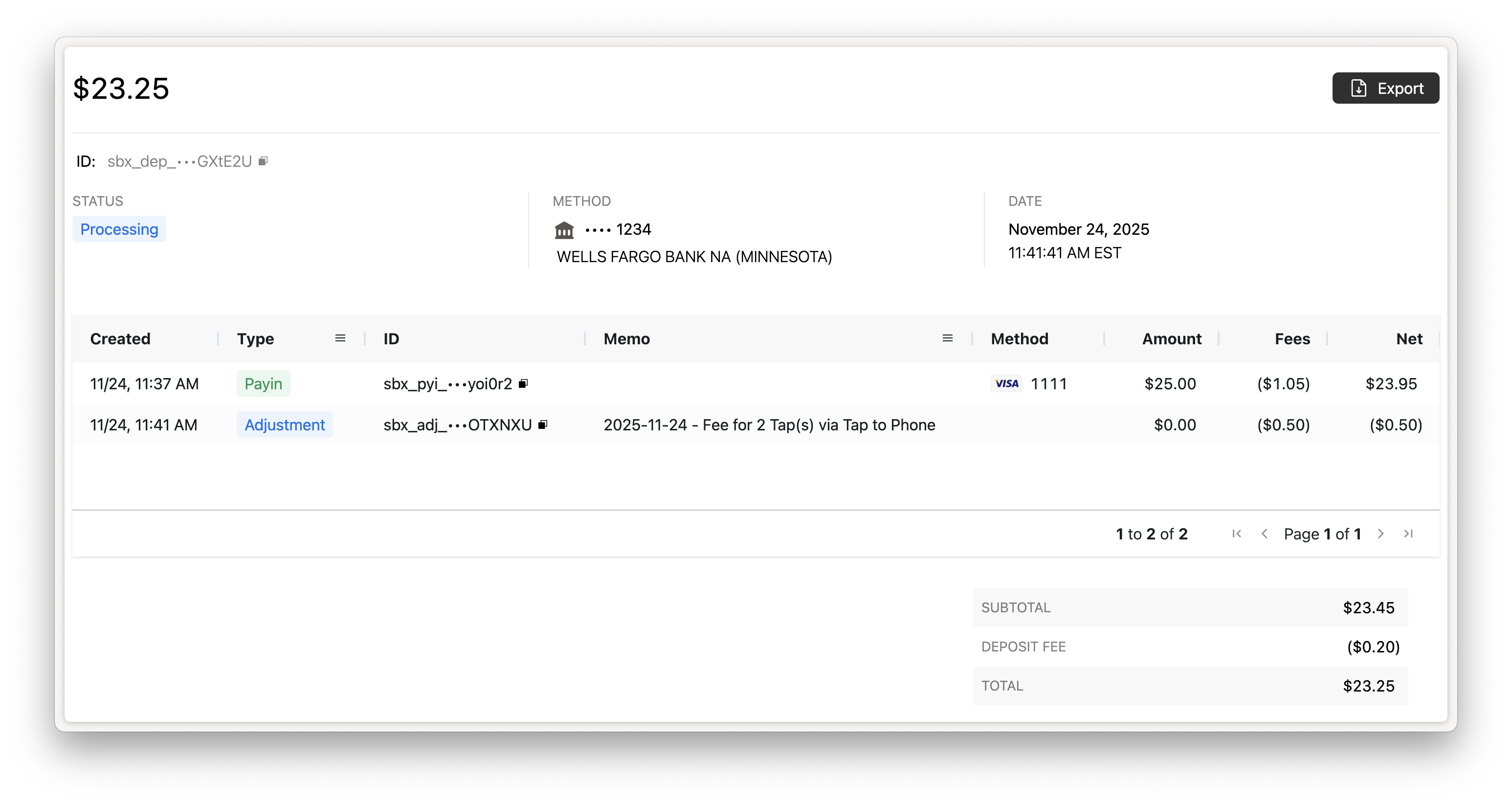
Configure the Deposit Report Component to include the memo column in the Deposit Details activity report to provide context on the billing adjustment to your merchant.
<rainforest-deposit-report
    activity-columns='[
    {"name":"Created","type":"builtin","value":"created_at"},
    {"name":"Type","type":"builtin","value":"type"},
    {"name":"ID","type":"builtin","value":"id"},
    {"name":"Memo","type":"builtin","value":"memo"},
    {"name":"Customer","type":"builtin","value":"billing_contact_name"},
    {"name":"Method","type":"builtin","value":"payment_method"},
    {"name":"Amount","type":"builtin","value":"gross_amount"},
    {"name":"Fees","type":"builtin","value":"billing_fees_amount"},
    {"name":"Net","type":"builtin","value":"net_amount"}
]'
></rainforest-deposit-report>
Updated 10 days ago