
Real-time underwriting verifications
Expedite approvals by verifying merchant information during application entry.
Rainforest must verify that the information provided in every merchant application is accurate. Many of these verifications occur after an application is submitted, but some can be completed in real-time before an application is submitted. Configuring these verifications to run before submission reduces data entry errors and potentially expedites the application approval process.
Real-time underwriting verification settings in the merchant onboarding component are configured by Rainforest at a Platform level for a no-code implementation (see: Default enablement). Real-time verification can also be performed via API.
Lifecycle of an underwriting verification
Underwriting verifications start as Disabled or Not Verified depending on whether the platform has the corresponding underwriting verification enabled.
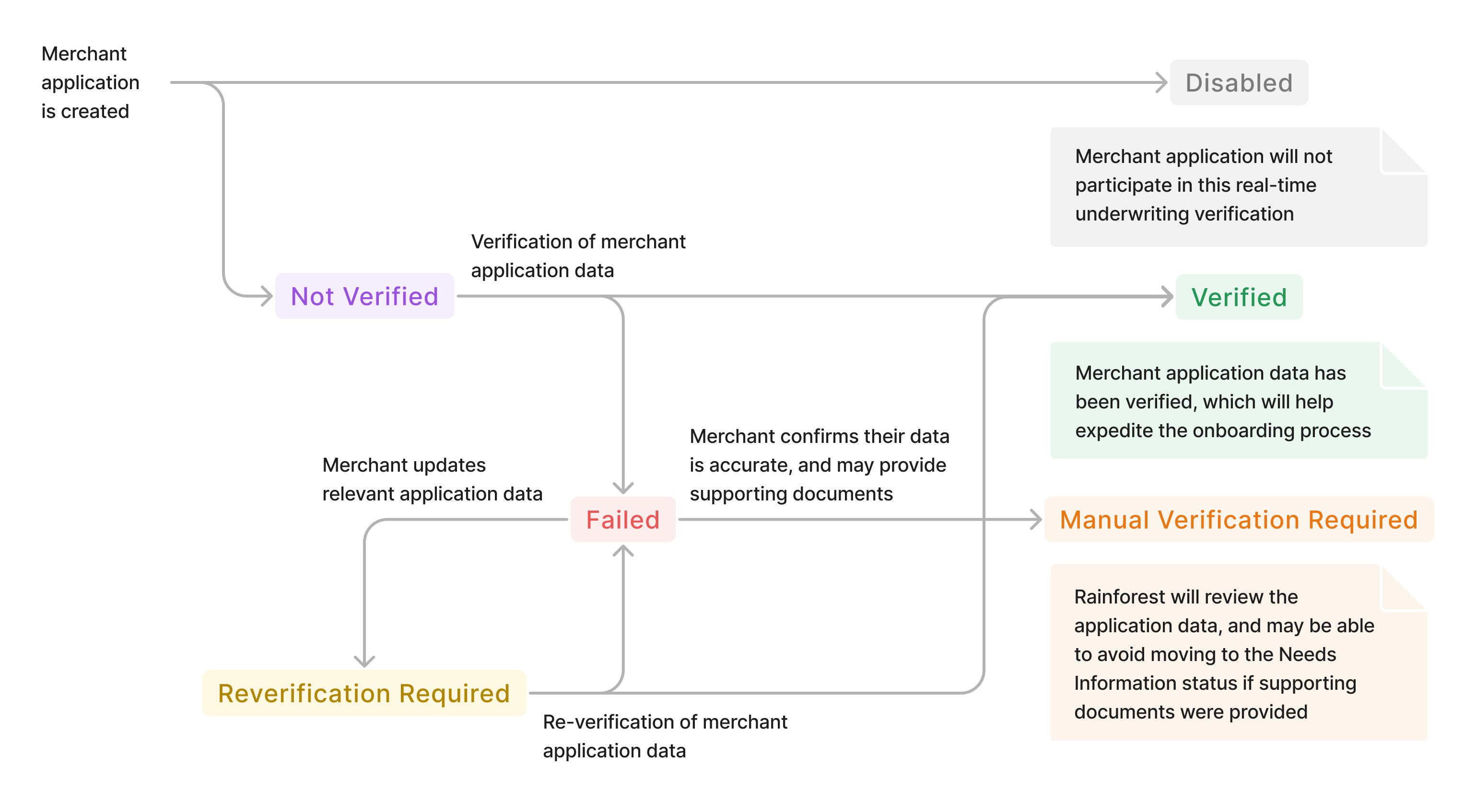
If an underwriting verification is enabled, its lifecycle follows three main steps.
- Trigger verification: If using the Rainforest merchant onboarding component, this happens automatically before the review page is shown. If using a direct API integration, this is triggered by the
/verifyendpoint. From here, a verification will transition toVerifiedorFaileddepending on whether Rainforest is able to verify the data. For example, Rainforest checks with the IRS to verify that each owner's SSN matches the owner's legal name. - Update application: A merchant may update the application after verification has run. If the merchant updates a field used in the verification (for example, the owner SSN or legal name) the verification will enter a
Reverification Requiredstatus. This allows a failed verification to retry with new data. The verification will transition out ofReverification Requiredwhen/verifyis triggered again. - Confirm application data: If Rainforest cannot verify the application data automatically, a merchant will be given the option to upload supporting documents to assist with verification. This will transition the verification from the
Failedstatus to theManual Verification Requiredstatus and may introduce onboarding delays.
In order to submit an application, all underwriting verifications attached to that application must be in one of the following statuses: Disabled, Verified, or Manual Verification Required.
On sandbox, a user can force verifications to fail by entering a tax id, ssn, or bank account number that ends in
1111. This allows a user to simulate failure scenarios for testing.
Statuses
| Underwriting verification status | Description | Next action |
|---|---|---|
NOT_VERIFIED | Verification has not yet run on application data. | The merchant onboarding component will automatically run verification when the merchant reaches the review page. If using a direct API integration, the |
VERIFIED | The application data has been verified. | No action required. |
FAILED | The application data was not able to be verified. | The merchant onboarding component will prompt the merchant to edit their data or confirm it is accurate. The merchant must edit their data or confirm it is accurate, optionally providing supporting documents. |
REVERIFICATION_REQUIRED | The application data has changed since the last verification. | The merchant onboarding component will automatically re-run verification when the merchant reaches the review page. If using a direct API integration, the |
MANUAL_VERIFICATION_REQUIRED | Rainforest was not able to verify the data, but the merchant has confirmed that the data is accurate and optionally provided supporting documents. | No action required. |
DISABLED | This real-time underwriting verifications is not enabled | No action required. |
Currently available real-time verifications
The following real-time verifications can be enabled:
- Tax ID matches business' legal name
- Owner SSN matches owner's name
- Bank account is open, active, and belongs to the business
- Estimated payment activity is within underwriting expectations
These verifications ensure that the merchant tax information, banking information, and financial estimates are entered correctly. Each of the verifications can be configured independently, so a platform can choose to selectively enable some real-time verifications without enabling others. However, Rainforest recommends all verifications be enabled to reduce the chances of an application entering a Needs Information status after submission.
Customization options
Each underwriting verification can be customized separately according to platform needs. This customization is completely optional.
Maximum verification attempts
Each verification can be configured to run a maximum number of times. Once a merchant has exceeded their maximum number of tries, the verification will transition to Failed and will require the merchant to enter Manual Verification Required to proceed.
Rainforest recommends setting the number of maximum verification attempts to 2.
File upload mode
Each underwriting verification has a file_upload_mode attribute which can be configured. When an underwriting verification is status Failed, the file_upload_mode dictates:
- How the merchant can enter the
Manual Verification Requiredstatus, and - How a merchant will be prompted to confirm their data is accurate in the merchant onboarding component
Below are the valid values, requirements, and behavior of file_upload_mode
| File upload mode | Files required to enter Manual Verification Required | Merchant onboarding component behavior when status Failed |
|---|---|---|
REQUIRED_ON_FAILURE | ✅ | The merchant is prompted to confirm their data is accurate, and is required to provide supporting documents. |
REQUESTED_ON_FAILURE | ❌ | The merchant is prompted to confirm their data is accurate, and to optionally provide supporting documents. |
NOT_REQUESTED | ❌ | The merchant is prompted to confirm their data is accurate, and is not presented with an option to upload supporting documents. |
If files are required, a merchant will not be able to enter the Manual Verification Required status without attaching files. Platforms using an API direct integration can attach files via the File uploads API.
Rainforest recommends requiring files for tax ID and owner SSN, and requesting files for bank account and financial estimates.
Additional customization for estimated payment activity
The "estimated payment activity" verification has two additional file upload modes.
ALWAYS_REQUESTED- request documents on every applicationALWAYS_REQUIRED- require documents on every application
If either of these modes are used, the merchant onboarding component will prompt the merchant to provide supporting documents regardless of the values entered by the merchant.
Summary of document types
| Verification | File upload mode options | Description of supporting documents |
|---|---|---|
| Tax ID |
| IRS SS-4 or similar documents |
| Owner SSN |
| Government issued identity document |
| Bank Account |
| Voided check or bank letter |
| Estimated Payment Activity |
| Financial 1: Processing statements or bank statements Financial 2: Processing statements, bank statements, and financial statements |
UI customization
It's possible to provide customized UI to the Merchant Onboarding component through our exposed slots.
Available Slots
| Name | Description |
|---|---|
details-loading-indicator | Overrides the default "Loading..." UI shown while verifying application data |
<rainforest-merchant-onboarding>
     <div slot="details-loading-indicator">
         (your custom UI markup)
     </div>
</rainforest-merchant-onboarding>
Tax ID verification
When Rainforest is unable to match the merchant's tax ID and business legal name, the merchant will be informed on the review page.
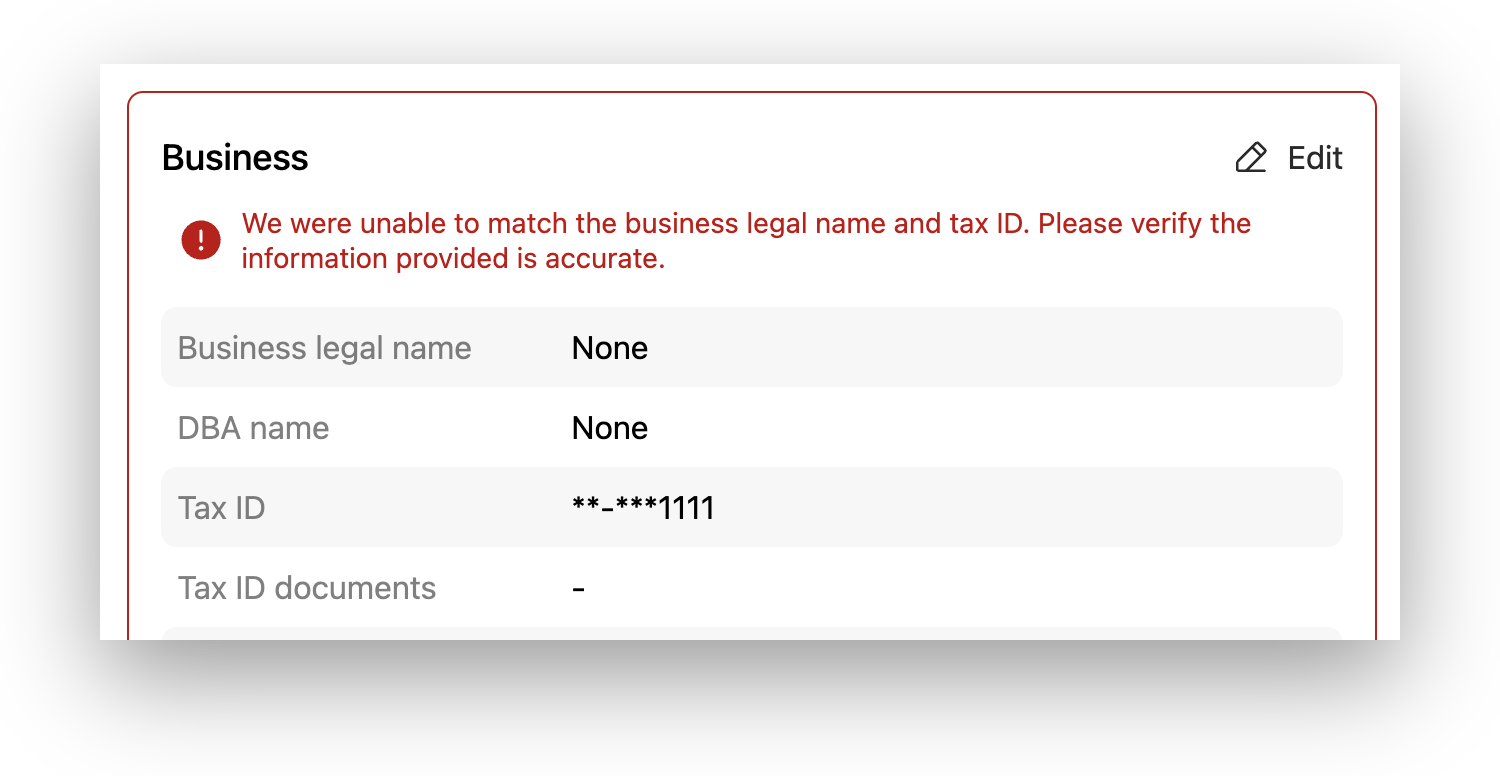
The verification can be configured to either not request (showing only a checkbox), request, or require documents.
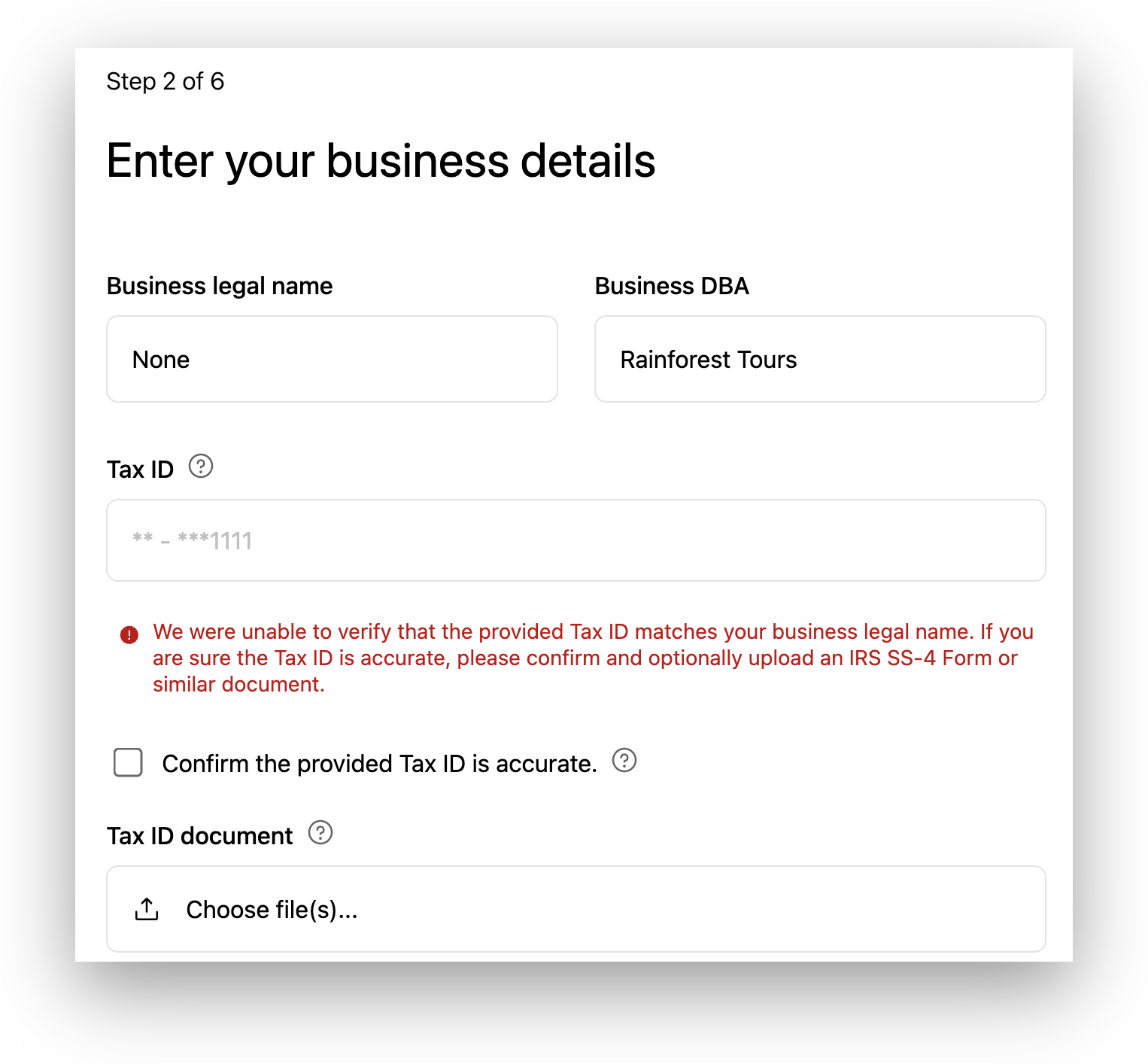
After uploading a document and clicking the confirmation checkbox, the merchant sees the error clear. In this case the merchant uploaded their SS-4 form. Rainforest does not verify that the file uploaded is actually an SS-4 form until after the application is submitted, so an application might be sent back to Needs Information if the merchant uploaded an incorrect file.
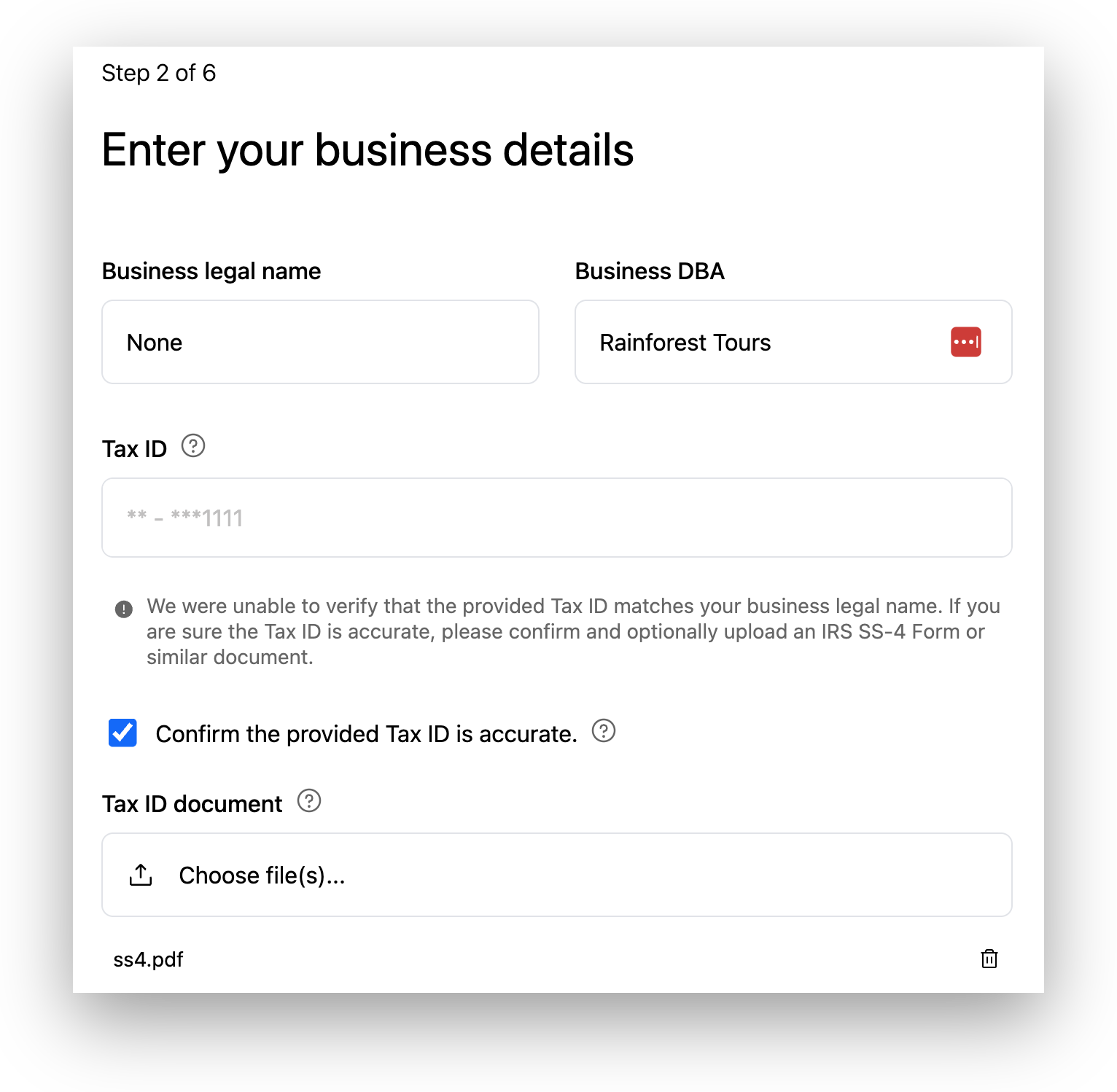
Owner SSN verification
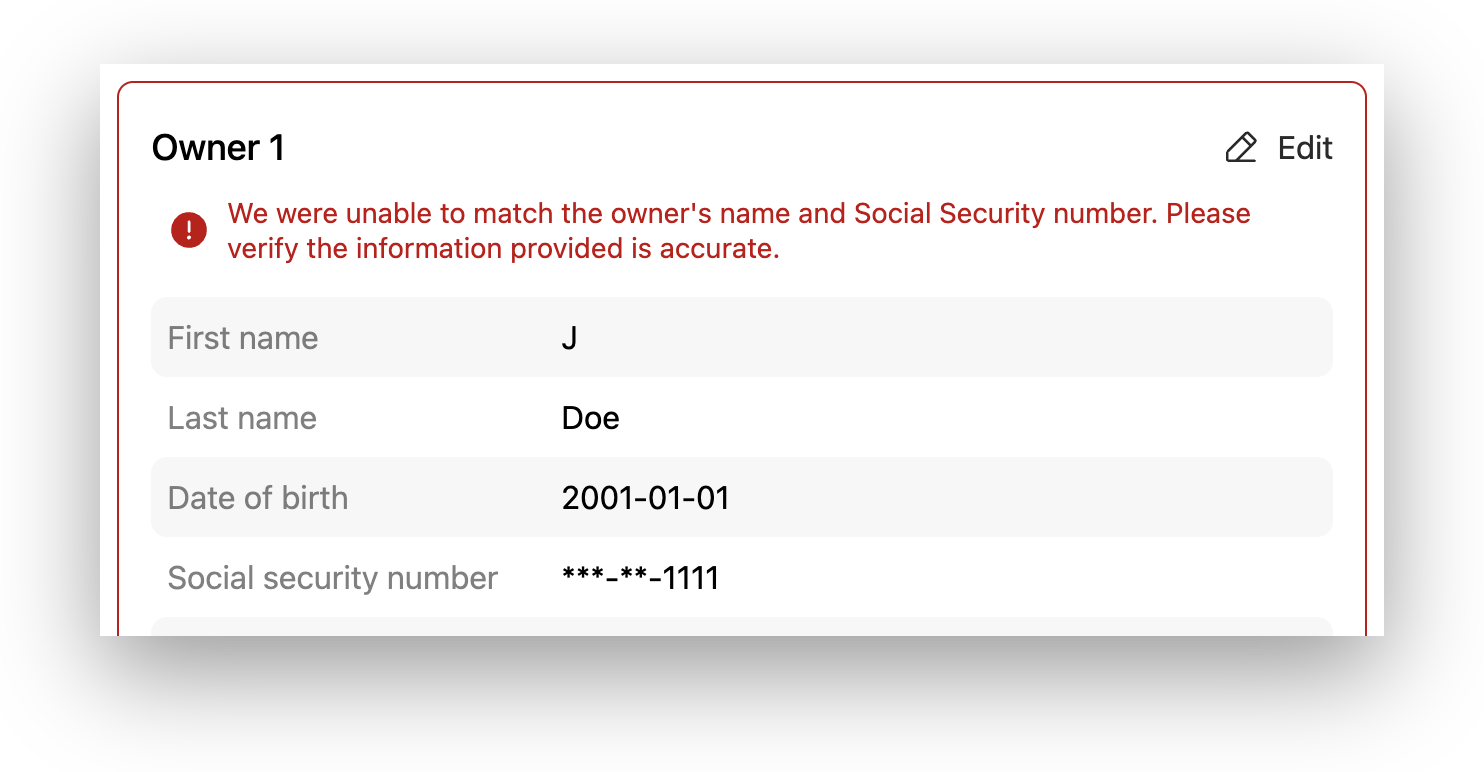
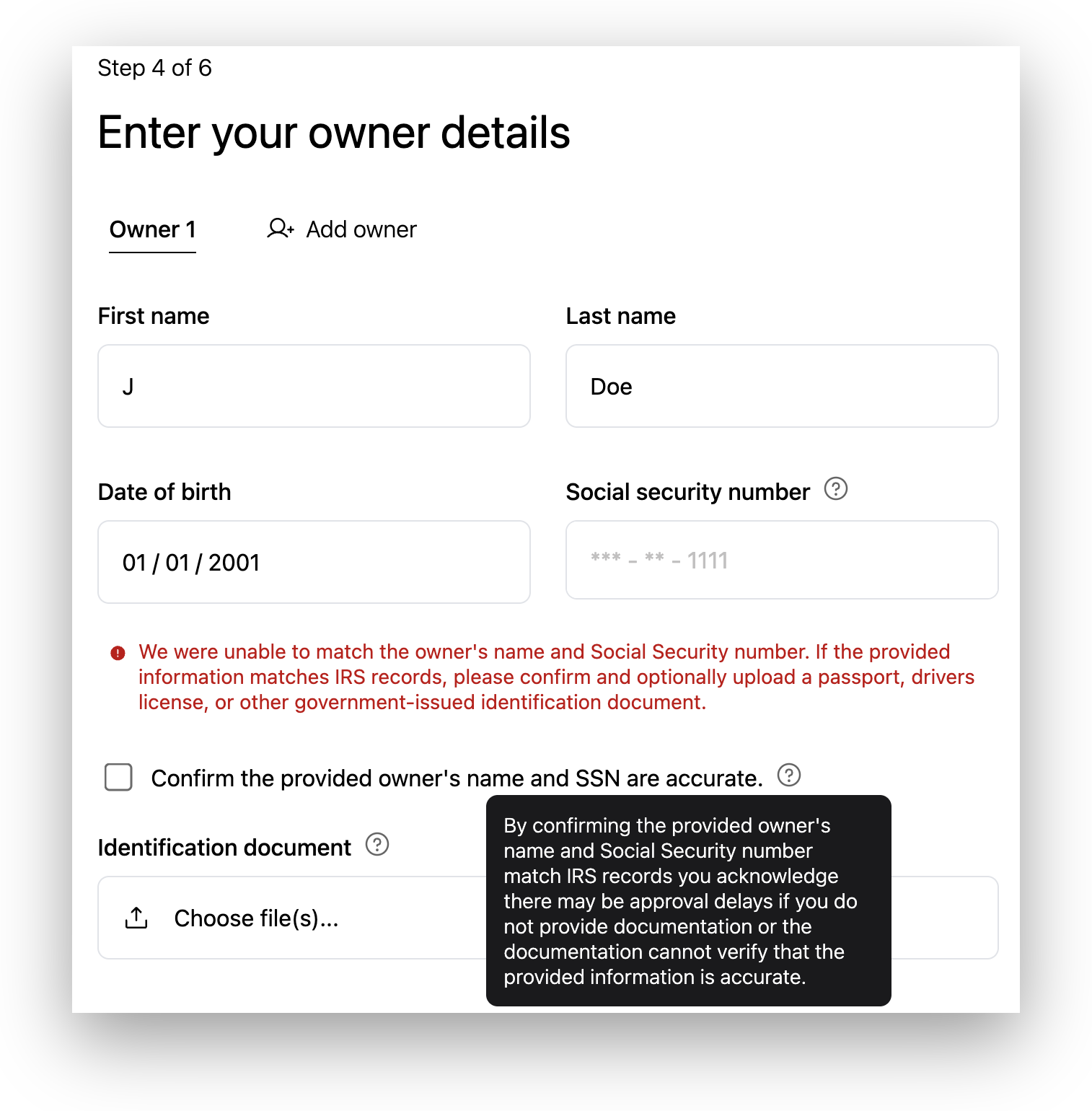
If the owner name does not match the SSN provided, the merchant will see an error on the review page. The accepted documents are flexible, but the merchant is shown a tooltip explaining that inaccurate or incomplete information may cause approval delays.
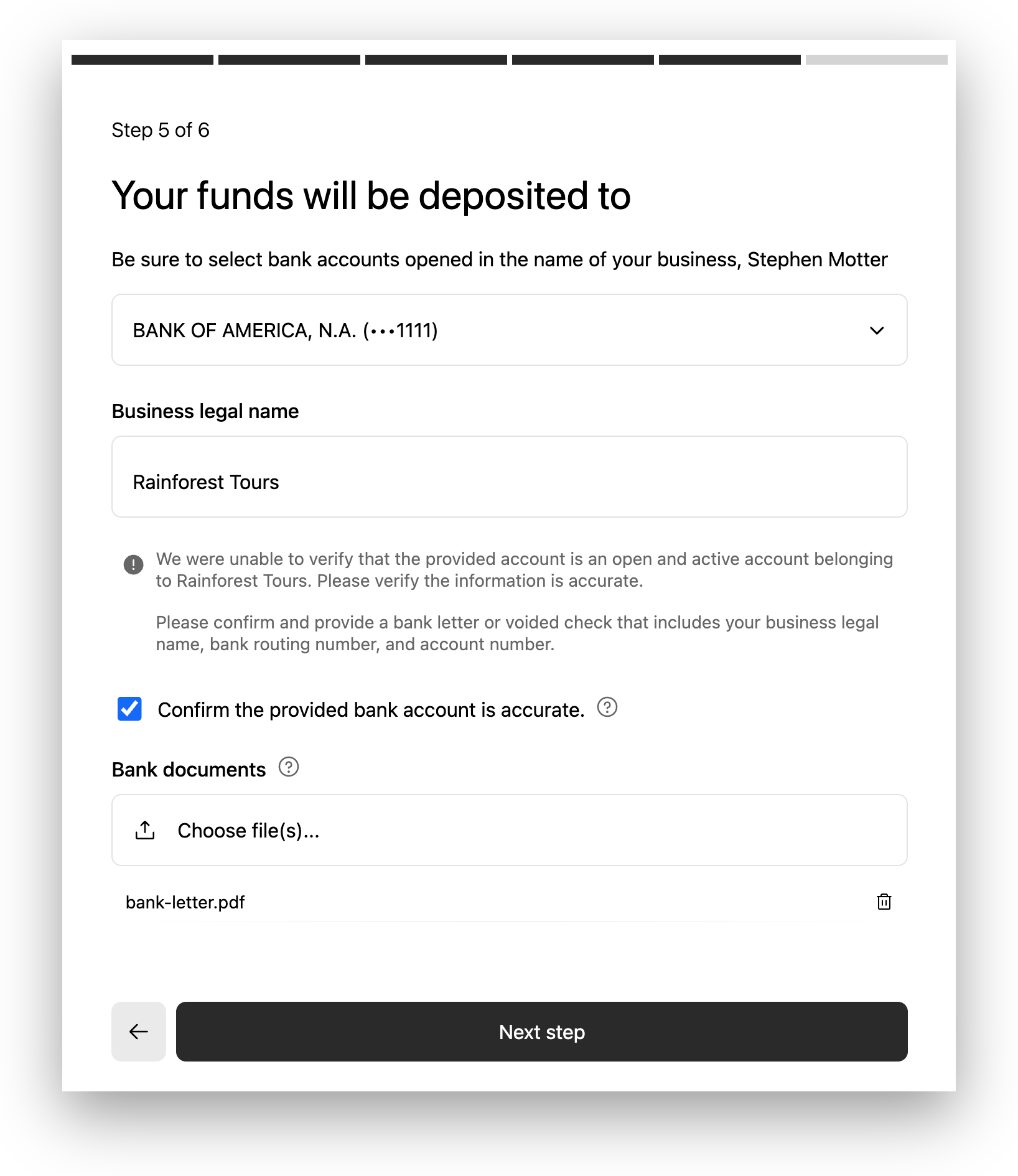
Bank verification
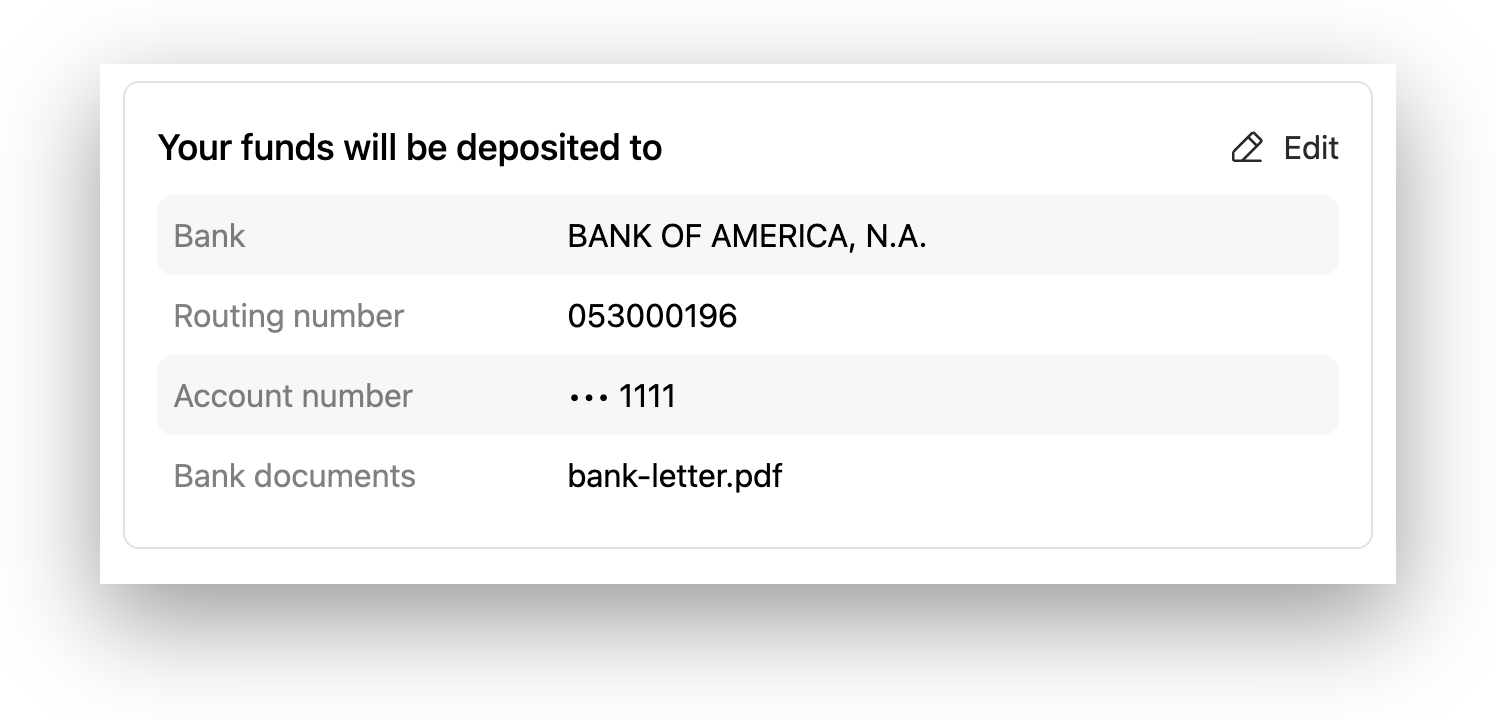
If Rainforest is unable to verify the provided bank account is open, active, and belongs the the business, the merchant can provide a bank letter or voided check to satisfy this requirement.
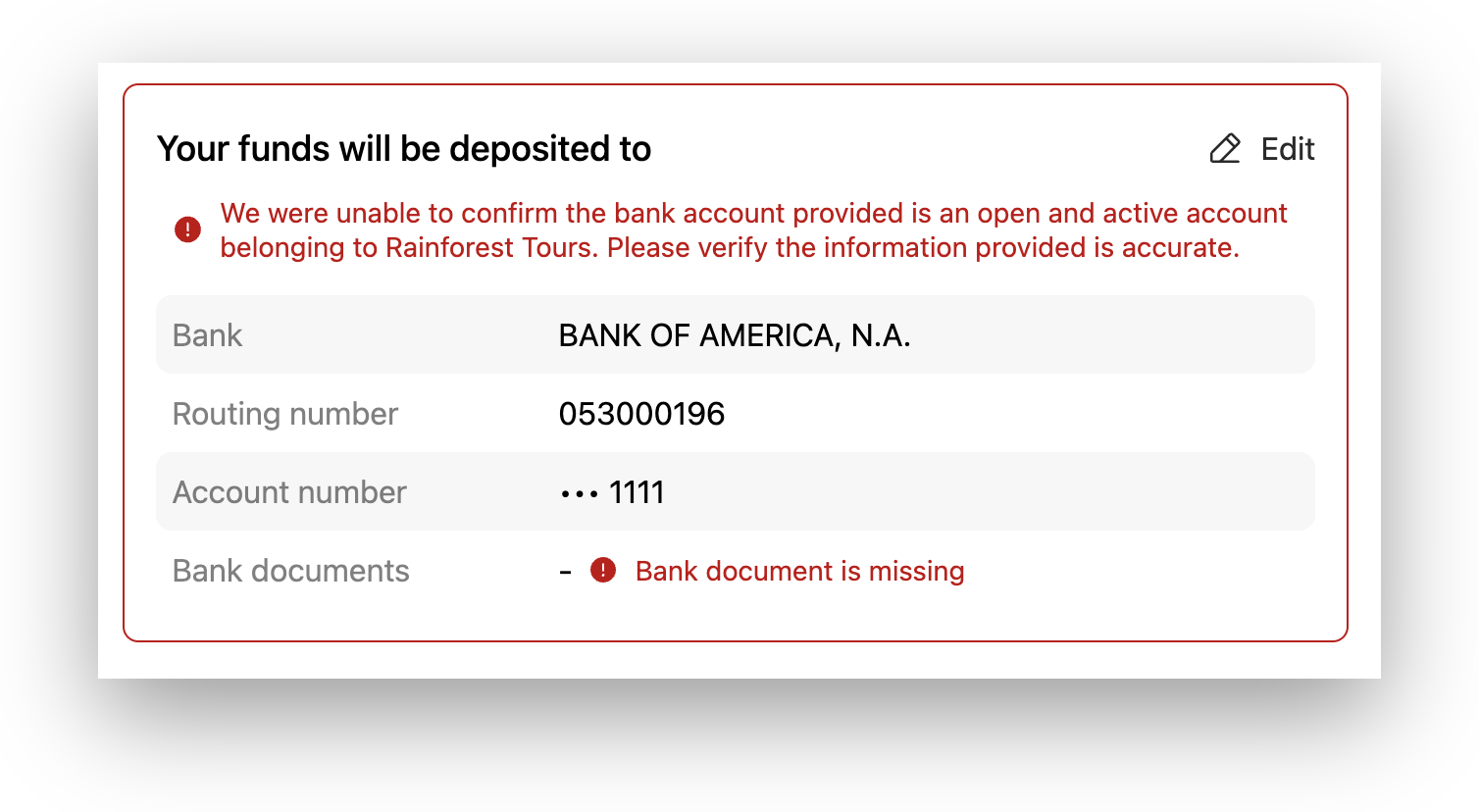
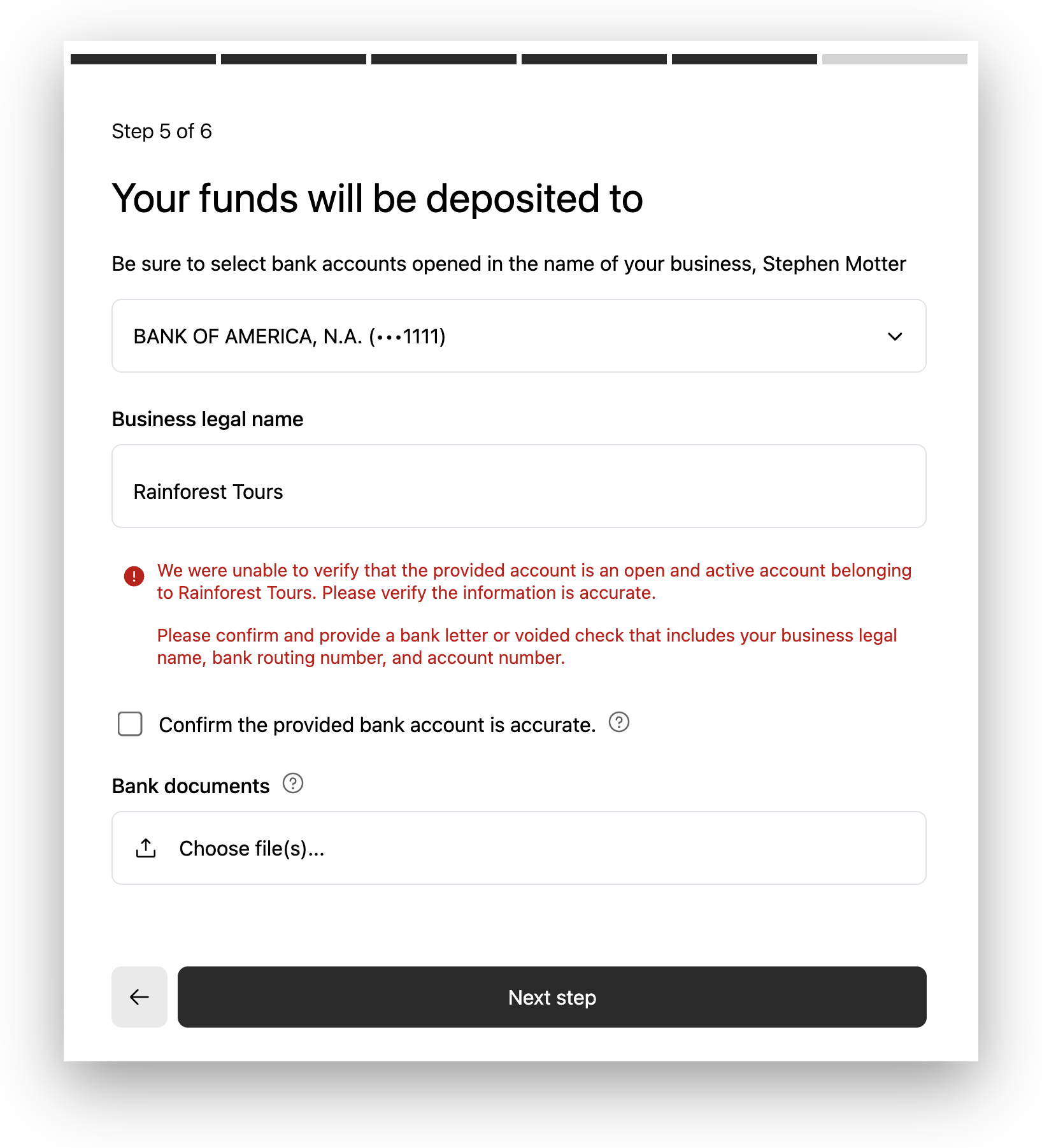
After uploading a document and confirming that the information is accurate, a merchant can proceed with application submission even if the check did not complete.
Estimated payment activity
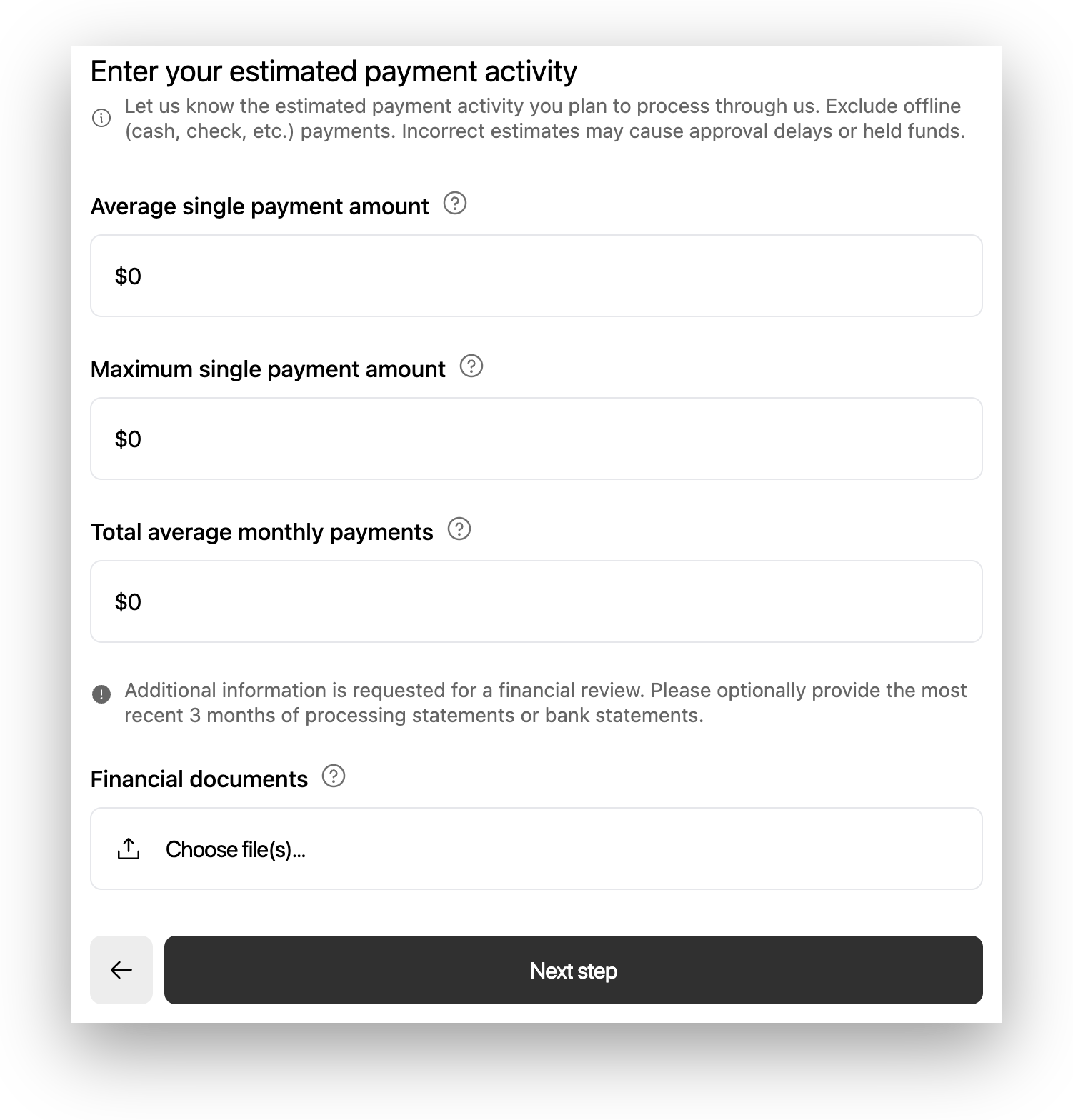
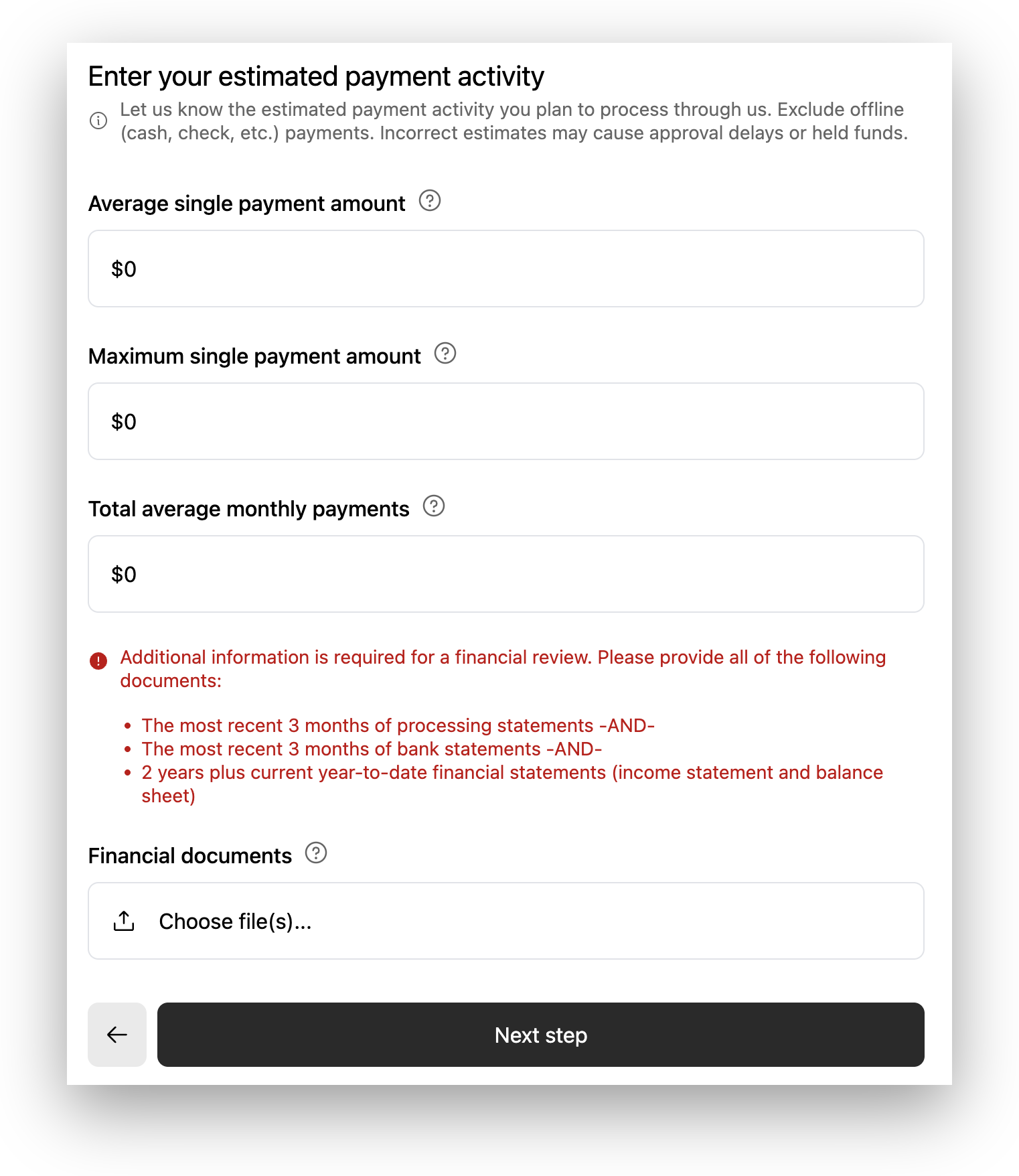
Rainforest uses the financial estimates provided on this page to determine whether to request financial documents. The flow can be configured to request different amounts of documents, and also whether it is an optional request or a hard requirement (blocking submission without documents).
Here is an example of optionally requesting FINANCIAL_1 documents.
Here is an example of requiring FINANCIAL_2 documents.
Direct API integration
Real-time underwriting verifications can be performed via API if a platform has approval for onboarding merchants via API.
Get merchant application underwriting verifications
Once enabled, the Get merchant application endpoint will return the current status of underwriting verifications, including whether they verified automatically and whether files are required.
{
    "underwriting_verifications": {
        "business_name_tin": {
            "status": "MANUAL_VERIFICATION_REQUIRED",
            "file_upload_mode": "REQUIRED_ON_FAILURE",
            "file_upload_ids": ["fiu_123"],
            "updated_at": "YYYY-MM-DDTHH:MM:SS",
            "confirmed_at": "YYYY-MM-DDTHH:MM:SS"
        },
        "deposit_method_1": {
            "status": "VERIFIED",
            "deposit_route_key": "PAYMENTS",
            "deposit_method_id": "dmt_123",
            "file_upload_mode": "NOT_REQUESTED",
            "file_upload_ids": [],
            "updated_at": "YYYY-MM-DDTHH:MM:SS",
            "confirmed_at": null
        },
        "deposit_method_2": null,
        "financial": {
            "status": "REVERIFICATION_REQUIRED",
            "financial_type": "financial_1",
            "file_upload_mode": "REQUESTED_ON_FAILURE",
            "file_upload_ids": [],
            "updated_at": "YYYY-MM-DDTHH:MM:SS",
            "confirmed_at": "YYYY-MM-DDTHH:MM:SS"
        },
        "owner_1_name_ssn": {
            "status": "FAILED",
            "file_upload_mode": "REQUESTED_ON_FAILURE",
            "file_upload_ids": [],
            "updated_at": "YYYY-MM-DDTHH:MM:SS",
            "confirmed_at": "YYYY-MM-DDTHH:MM:SS"
        },
        "owner_2_name_ssn": null,
        "owner_3_name_ssn": null,
        "owner_4_name_ssn": null
    }
}
Applicable underwriting verifications
Some underwriting verifications may not be applicable, depending on how the merchant is configured and their application data. Note that underwriting verifications that are not applicable will be null in the Get merchant application response. As related application data changes (e.g. owner 2 is added / removed), the corresponding underwriting verification may appear or disappear.
| Underwriting verification | Applicable |
|---|---|
business_name_tin | Applicable if the merchant's organization type requires business tax ID to be collected. |
deposit_method_1 | Applicable if the merchant is providing a Funding (PAYMENTS) deposit method. |
deposit_method_2 | Applicable if the merchant is providing a Billing (BILLING) deposit method. |
financial | Always applicable. |
owner_1_name_ssn | Applicable if the merchant's organization type requires owner / representative SSNs to be collected. |
owner_2_name_ssn | Applicable if owner_2 is present and the merchant's organization type requires owner / representative SSNs to be collected. |
owner_3_name_ssn | Applicable if owner_3 is present and the merchant's organization type requires owner / representative SSNs to be collected. |
owner_4_name_ssn | Applicable if owner_4 is present and the merchant's organization type requires owner / representative SSNs to be collected. |
Triggering verification
To action a NOT_VERIFIED or REVERIFICATION_REQUIRED verification, call the verify endpoint /v1/merchants/{{merchant_id}}/applications/{{merchant_application_id}}/verify to trigger the verifications.
Note that the merchant application must be completely filled out in order to perform verification.
Actioning failed verifications
- First, note whether the
file_upload_modeisNOT_REQUESTED,REQUESTED_ON_FAILURE, orREQUIRED_ON_FAILURE. - If
REQUESTED_ON_FAILUREorREQUIRED_ON_FAILURE, files can be uploaded via the File uploads API and attached to the application if the merchant id and underwriting verification type is provided in the file upload config.
{
    "idempotency_key": "e2365adc-d9c9-4eef-9e58-45b5d95135d6",
    "type": "OWNER_NAME_SSN_VERIFICATION",
    "filename": "drivers-license.png",
    "merchant_id": "mid_38tdSIiXzWh553F3J27k3gM08DP"
}| Underwriting verification | File upload type |
|---|---|
business_name_tin | BUSINESS_NAME_TIN_VERIFICATION |
deposit_method_1 | DEPOSIT_METHOD_VERIFICATION |
deposit_method_2 | DEPOSIT_METHOD_VERIFICATION |
financial | FINANCIAL_REVIEW |
owner_1_name_ssn | OWNER_NAME_SSN_VERIFICATION |
owner_2_name_ssn | OWNER_NAME_SSN_VERIFICATION |
owner_3_name_ssn | OWNER_NAME_SSN_VERIFICATION |
owner_4_name_ssn | OWNER_NAME_SSN_VERIFICATION |
- Complete the file upload to receive a file upload id, and then attach it to the application.
{
    "underwriting_verifications": {
        "owner_1_name_ssn": {
            "file_upload_ids": ["fiu_123", "fiu_456"]
        }
    }
}- Then, use the Update merchant application API to PATCH a
confirmedvalue onto the verification.
{
    "underwriting_verifications": {
        "owner_1_name_ssn": {
            "confirmed": true
        }
    }
}
A failed verification that has been actioned in this way will transition to a MANUAL_VERIFICATION_REQUIRED status, indicating that it will not block application submission and the the verification will happen later.
Default enablement
Rainforest enables new platforms with the following default configuration:
| Underwriting verification | Enabled | File upload mode | Number of attempts |
|---|---|---|---|
| Tax ID | ✅ | REQUESTED_ON_FAILURE | 2 |
| Owner SSN | ✅ | REQUESTED_ON_FAILURE | 2 |
| Bank Account | ✅ | REQUESTED_ON_FAILURE | 2 |
| Estimated Payment Activity | ❌ | N/A | N/A |
Please contact [email protected] or your Platform Success Manager to request changes to this configuration. They will schedule a call with you to update your sandbox access and customize your onboarding process. Note that changes to real-time verification configuration will only apply to new merchant applications, not existing in-flight applications.
Updated 7 months ago