
SDK compatibility modes
Compatibility modes for iOS versions less than 17.4
iOS SDK compatibility modes
When running the Rainforest SDK in iOS less than 17.4, the SDK needs to be integrated in a different manner than when only running on iOS =<17.4. In supported iOS versions, the SDK and its dependencies can be embedded and linked by the application at run time without issue. When running on an older version of iOS, the application cannot automatically link the SKD at runtime and this will cause build time errors. This a function of how the iOS builds and runtime work natively.
To prevent this run time error, it's important that the SDK dependencies are embedded at build time but not automatically linked at runtime.
- Add the
RainforestSDK-Compatxcframework - You will continue to embed, link and sign this xcframework. - Adding
RainforestTapToPhoneandCloudCommercexcframeworks - The dependencies need to be embedded and signed. However, they CANNOT be linked.
Adding in Xcode
-
Open your project in xcode, and look at the target settings
-
All 3 frameworks should appear as "Embed & Sign" under General > Frameworks, Libraries and Embedded Content

-
Navigate to Build Phases
-
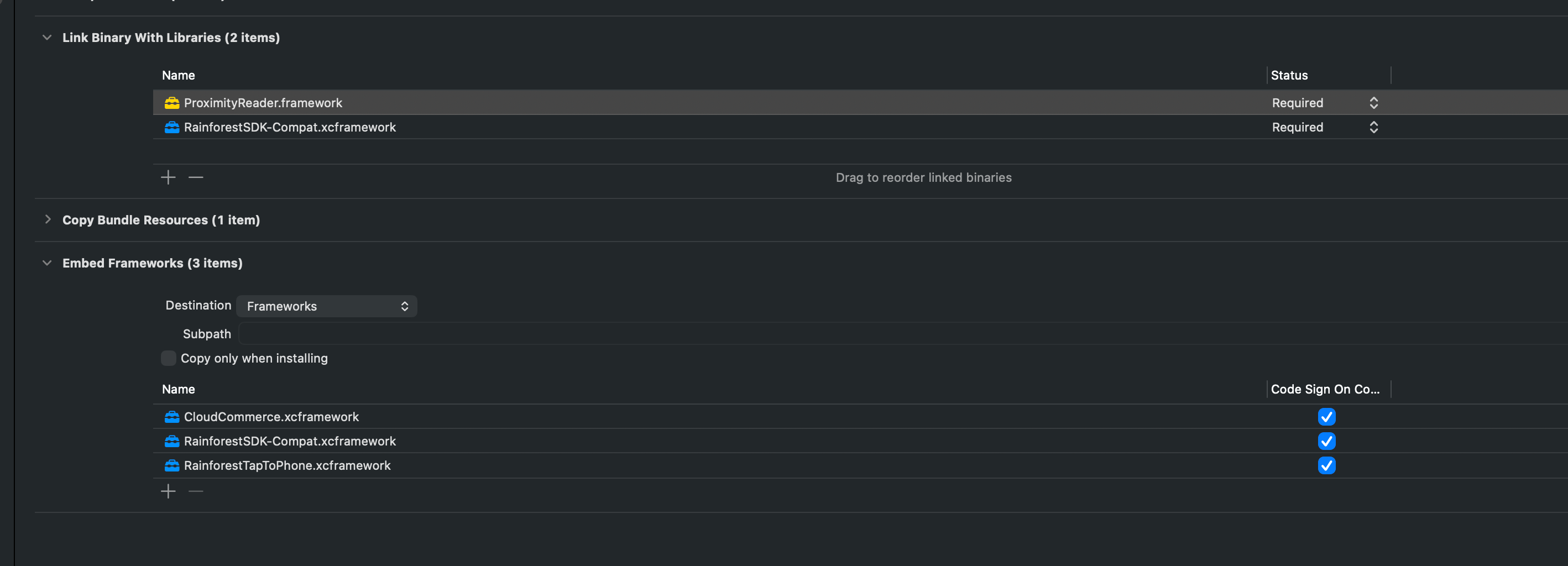
All 3 frameworks should appear in the Embedded Frameworks section
-
Only the RainforestSDK-Compat should appear in the Link Binaries with Libraries. THIS IS VERY IMPORTANT: if the RainforestTapToPhone or CloudCommerce are linked, then the application will fail at runtime.
-
Updated 3 months ago