
On-demand deposits
Deposit a merchant's available balance between their scheduled deposits
Merchants receive deposits on a schedule set by their deposit frequency. A merchant on a weekly or monthly deposit frequency may need their funds before their next scheduled deposit. On-demand deposits let the platform request a deposit of the merchant's available balance at any time between scheduled deposits.
How on-demand deposits work
A platform can request to process a merchant’s funding deposit on-demand. If the request is accepted, Rainforest will create the deposit in the status of Scheduled with the amount of the deposit and the date the deposit is scheduled to process on.
Deposit amount
An on-demand deposit includes the merchant's full available balance at the moment it is requested. The available balance is made up of every payment that has succeeded and not yet been deposited, including payins, refunds, chargebacks, and ACH returns. The amount is set when the deposit is scheduled and does not change before it processes.
Payins processed on the day of the request have not yet succeeded, so they are not part of the available balance. These payins will be included in the merchant's next deposit.
Scheduled deposit date
An on-demand deposit is scheduled for the next banking day after the request, based on Eastern Time. A deposit requested at 2:00 AM ET or 11:00 PM ET on a Tuesday is scheduled to process on Wednesday. A deposit requested on a Friday, Saturday, or Sunday is scheduled for Monday, or for Tuesday if Monday is a banking holiday.
Once a scheduled deposit is processing, it will follow the same deposit lifecycle as any other deposit.
Request window
On-demand deposits can be requested at any time, every day, except between midnight and 1:00 AM ET.
Eligibility
The platform can request an on-demand deposit for a merchant when:
- The merchant is active and their deposits are enabled
- The merchant is on a weekly or monthly deposit frequency
- The merchant has a positive available balance
- The merchant does not already have an on-demand deposit that is Scheduled or Processing
- The on-demand deposit would process before the merchant's next scheduled deposit.
Deposit frequency constraint
An on-demand deposit cannot be scheduled for the same day a merchant is already configured to receive a deposit based on their deposit frequency of weekly or monthly.
For example, a weekly merchant whose scheduled deposit processes on Monday cannot request an on-demand deposit on Friday, Saturday, or Sunday, since the request would schedule a deposit for Monday, the same day their deposit is already configured to process on.
For the same reason, merchants on a daily deposit frequency are not eligible for on-demand deposits.
Deposit statuses
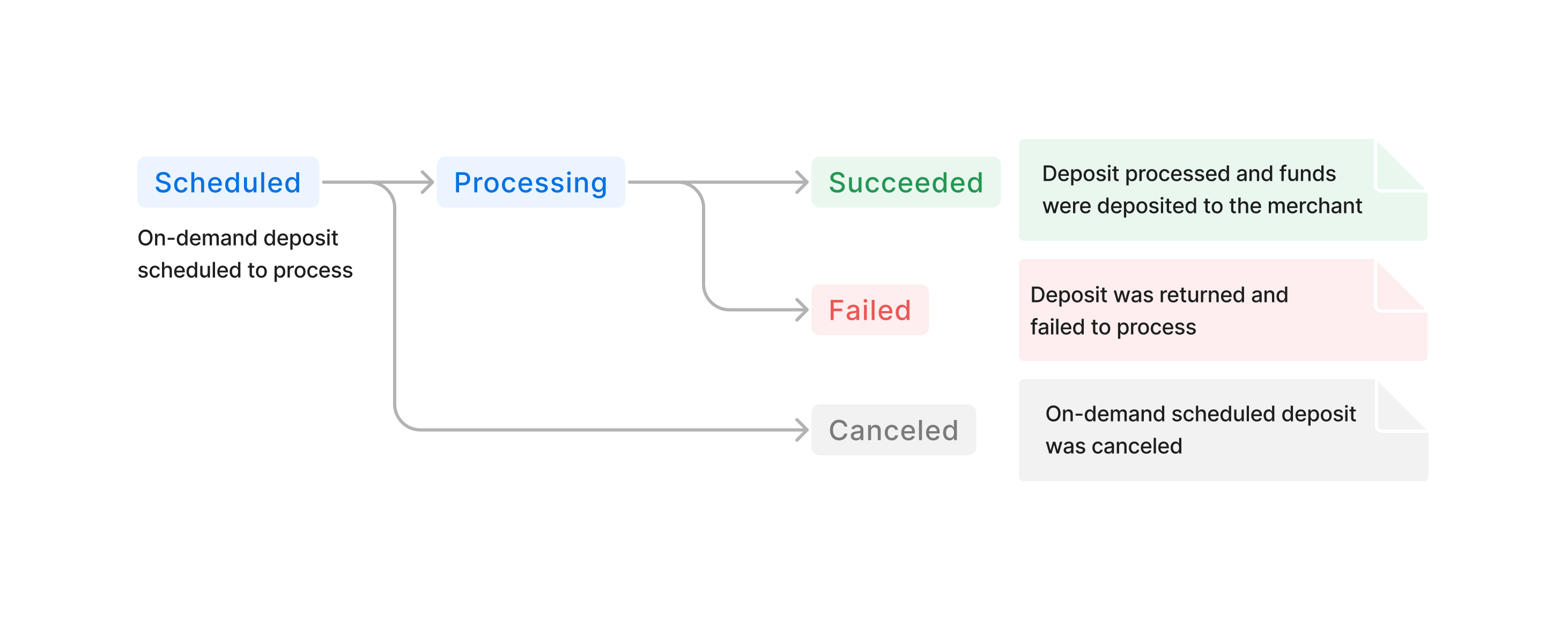
On-demand deposits add two statuses to the deposit lifecycle: Scheduled and Canceled.
| Status | Description |
|---|---|
| Scheduled | The on-demand deposit has been requested and is scheduled to process on the scheduled deposit date. |
| Processing | The deposit has been approved and funds are being sent to the merchant's deposit method. |
| Succeeded | The funds have been deposited into the merchant's bank account. |
| Failed | The deposit was returned by the merchant's bank. |
| Canceled | The on-demand deposit was canceled before it processed. The funds return to the merchant's available balance. |
Cancel an on-demand deposit
An on-demand deposit can be canceled at any time while it is Scheduled. Once the deposit is Processing, it can no longer be canceled.
When a deposit is canceled, its funds return to the merchant's available balance and will be included in the merchant's next deposit.
An on-demand deposit can be canceled by:
- The platform - through the API
- The merchant - from the Deposit Report Component, when the platform allows it
- Rainforest - if the deposit is rejected prior to processing, or if the merchant's deposits are disabled or the merchant is no longer active before the deposit processes
The deposit will return who it was canceled by and the reason for canceling, if provided.
Billing
On-demand deposits are billed the same as any other deposit. Each on-demand deposit incurs a deposit fee, which can be passed onto the merchant via the merchant billing profile. There are no additional fees for on-demand deposits.
For merchants on gross billing, an on-demand deposit is a funding deposit, and its deposit fee is billed in the merchant's billing deposit.
On-demand deposits in reports
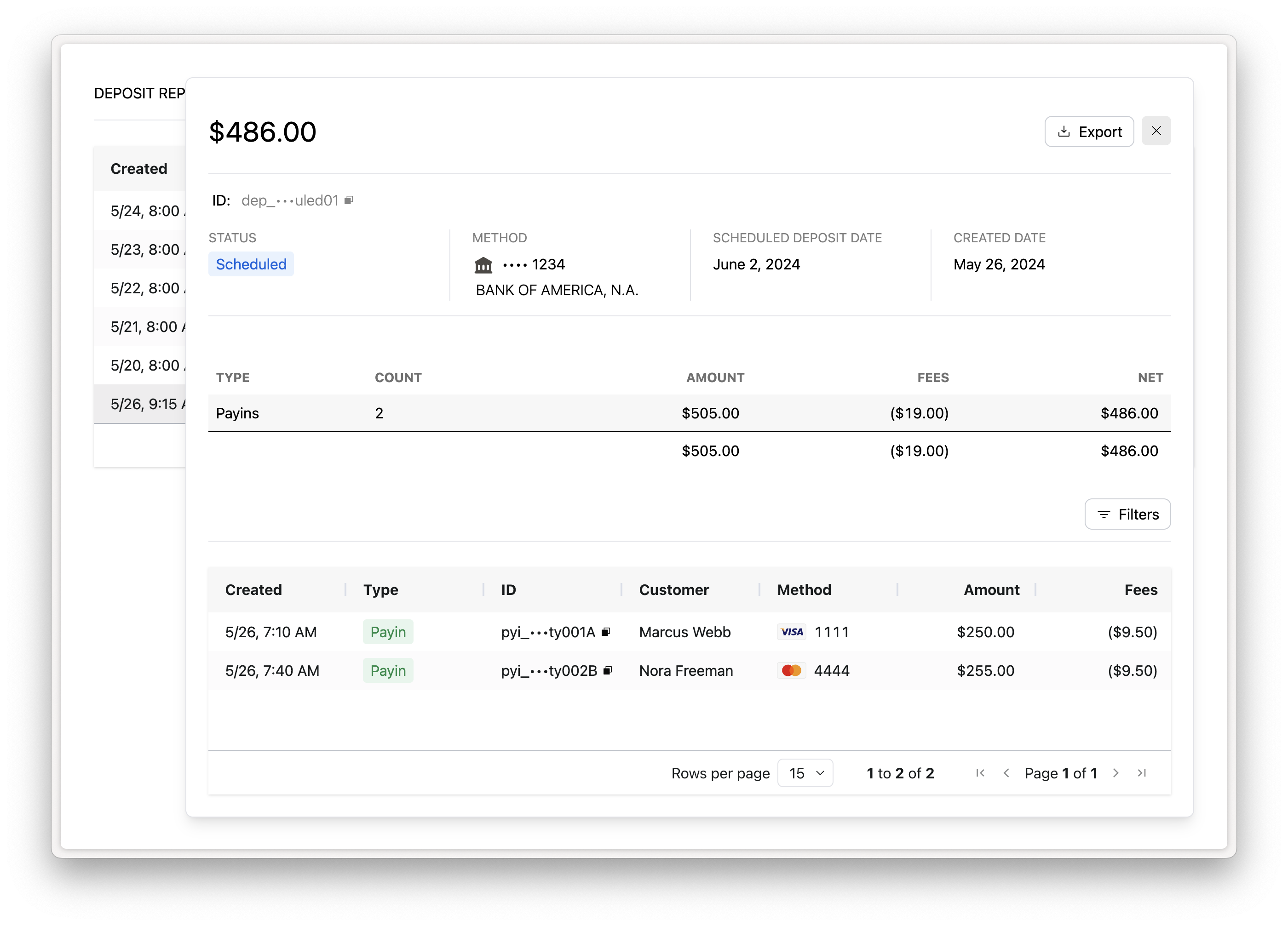
On-demand deposits appear in the Deposit Report Component and the list deposits endpoint alongside the merchant's other deposits with a status of Scheduled.
The deposit details show the following dates:
- Scheduled Deposit Date - when the deposit is scheduled to process
- Created Date - when the deposit was requested and created
- Processed Date - when the deposit processed
Updated about 15 hours ago