
Payout receivers
Understanding payout receivers in the Rainforest ecosystem
Early PreviewThis feature is currently in Beta. Please contact Rainforest support or your Platform Success Manager for more information on Payouts.
In the Rainforest ecosystem, a Payout Receiver is who a merchant pays when they send a payout. Each payout receiver belongs to one merchant and holds the verified bank accounts that payouts are sent to.
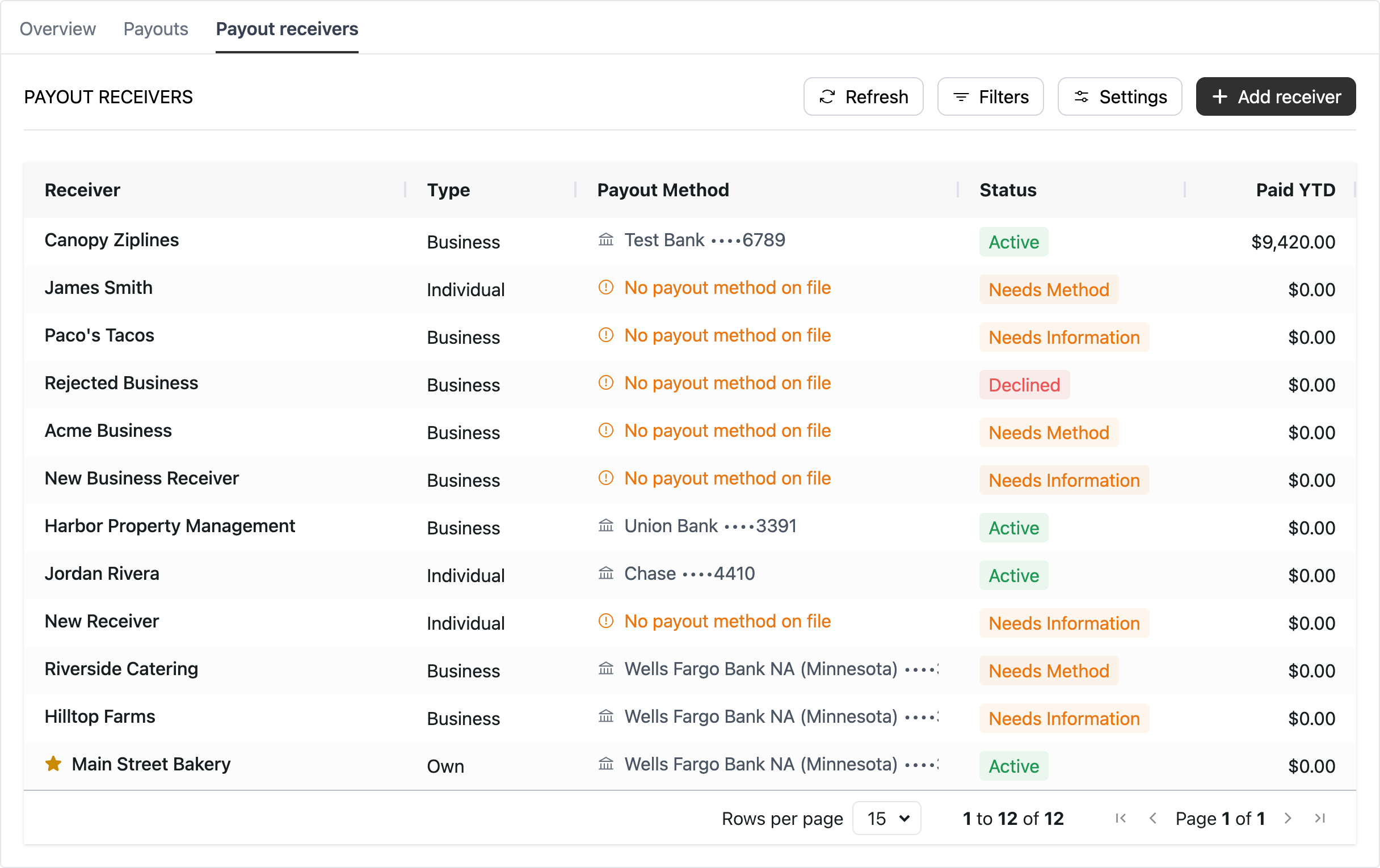
A payout receiver is identified by the payout_receiver_id in the Rainforest ecosystem. The prefix for a payout_receiver_id is rcv_ on Production and sbx_rcv_ on Sandbox.
Payout receiver types
The payout receiver type identifies who the merchant is paying: the merchant themselves, or a third-party business or individual. The type determines how the payout receiver is onboarded and how Rainforest verifies them before they can be paid.
| Type | Who they are | Verification |
|---|---|---|
MERCHANT | The merchant themselves, paying out their own funds to their own bank account. | Already verified in merchant onboarding. Each merchant is automatically onboarded as their own payout receiver when payouts are enabled on the platform, and is Active right away. |
EXTERNAL_BUSINESS | A third-party business the merchant pays, such as a supplier or landlord. | Rainforest onboards and verifies the business before they can be paid. |
EXTERNAL_INDIVIDUAL | A third-party individual the merchant pays, such as a contractor. | Rainforest onboards and verifies the individual before they can be paid. |
A merchant can have one payout receiver of type MERCHANT, which represents themselves. Paying out to themselves is how a merchant receives their own funds with on-demand merchant payouts.
Onboarding payout receivers
Every payout receiver is verified by Rainforest before they can be paid. The following information is collected to onboard a payout receiver:
- Name: The legal name of the business or individual being paid.
- Bank account: The bank account that payouts are sent to.
- Friendly name: The name the merchant uses to identify the payout receiver.
- Default payout category: The payout category applied to payouts sent to the payout receiver, unless a different category is set on the payout.
How this information is collected depends on whether the payout receiver is the merchant themselves or a third party business or individual.
The merchant as the payout receiver
When payouts are enabled on the platform, each merchant is automatically onboarded as their own payout receiver. The merchant was already verified in merchant onboarding, so there is nothing new to collect, and the payout receiver is Active right away.
- Name: The merchant's name from merchant onboarding. If the merchant is an individual, this is their first and last name. For every other merchant type, this is the merchant's legal business name.
- Bank account: The merchant's deposit bank account. The merchant can add other bank accounts by authenticating into their online bank account through Rainforest's third-party partner, Plaid, or by entering the account and routing numbers. Only the owner of a bank account can authenticate into it, so the merchant cannot use Plaid to add a bank account for a third-party payout receiver.
- Default payout category: The default payout category is Own Account.
Third-party payout receivers
A third-party business or individual is onboarded and verified by Rainforest before they can be paid.
- Name: The business's legal registered business name, or the individual's first and last name.
- Bank account: The bank account that payouts are sent to.
- Default payout category: The default payout category is set by the merchant.
A third-party payout receiver can be onboarded by the merchant or by the payout receiver themselves.
Onboarded by the merchant
The merchant enters the payout receiver's name and bank account, along with the friendly name and default payout category. The merchant enters the bank account with the account and routing numbers, since only the owner of a bank account can authenticate into it through Plaid.
Onboarded by the payout receiver
The payout receiver enters their own name and bank account. They can add their bank account by authenticating into their online bank account through Rainforest's third-party partner, Plaid, or by entering the account and routing numbers. The friendly name and default payout category are set by the merchant or platform, so the payout receiver does not see them.
Payout receiver statuses
The payout receiver status is the descriptor of the current status in the life cycle of the payout receiver.
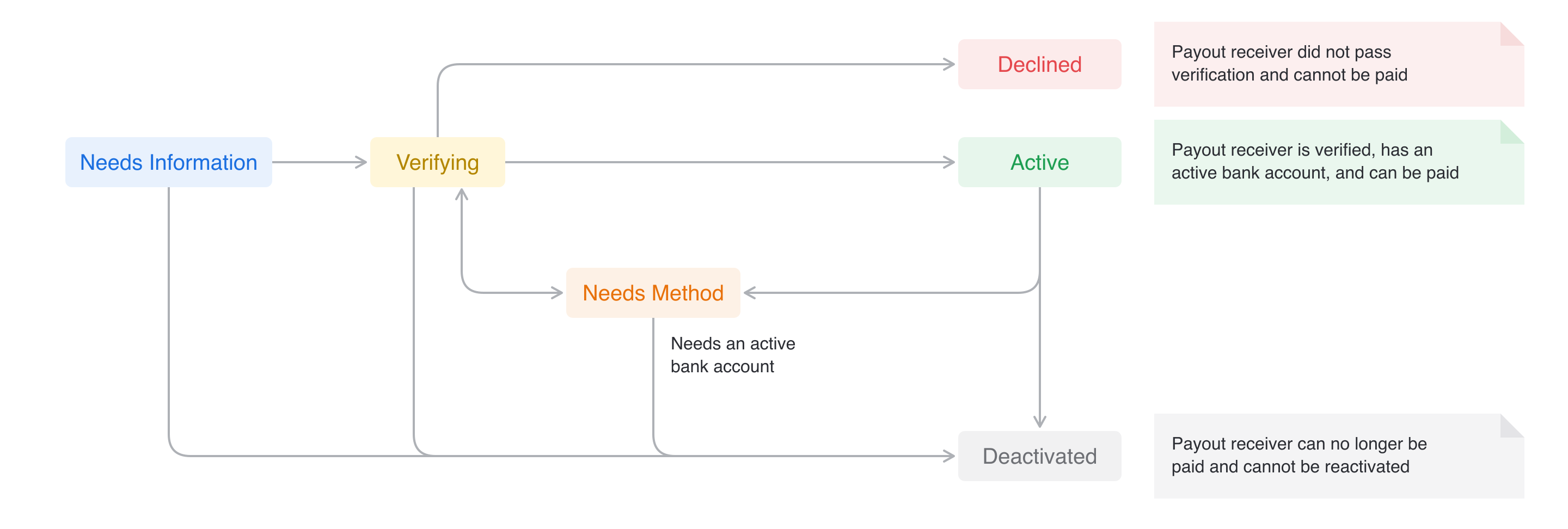
| Status | Description |
|---|---|
NEEDS_INFORMATION | Payout receiver was created and their details are still being collected before it can be submitted. |
VERIFYING | Payout receiver was submitted and Rainforest is verifying them. This is an interim status. |
NEEDS_METHOD | Payout receiver does not have an active bank account. Add and verify a bank account to continue. |
ACTIVE | Payout receiver can be paid. |
DECLINED | Payout receiver did not pass verification and cannot be paid. |
DEACTIVATED | Payout receiver was deactivated and can no longer be paid. |
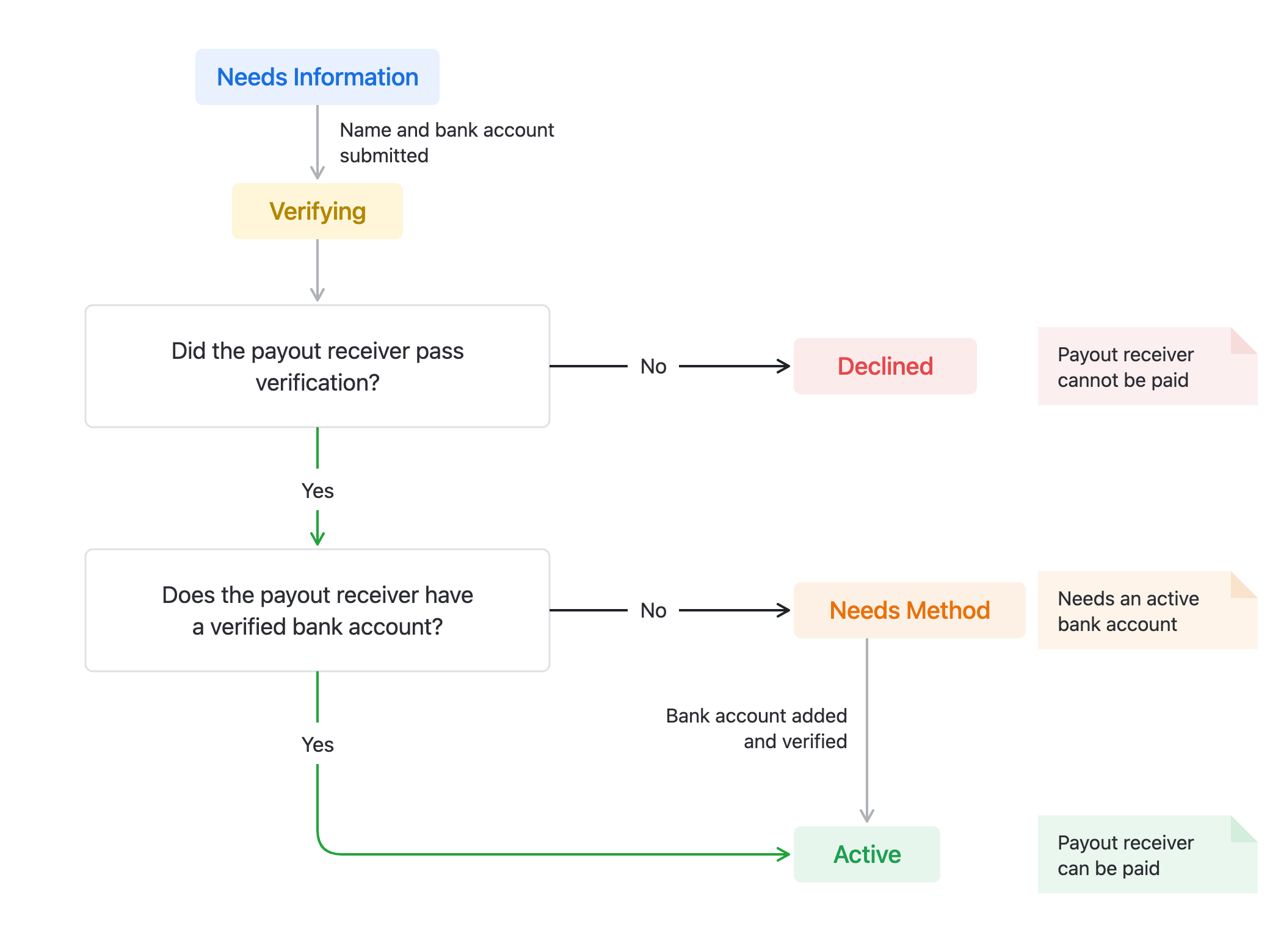
After Rainforest verifies the payout receiver, they move to Active if they have a verified bank account and are ready to receive a payout.
If the bank account cannot be verified as a valid bank account belonging to the receiver, the payout receiver will move to the status of Needs Method. The merchant or receiver will need to come back to the Component to update or add a new bank account.
If the payout receiver does not pass verification, they move to Declined and cannot be paid.
Payout receiver payout method
Payouts are sent to a bank account on the payout receiver, by ACH. This bank account is stored in the Rainforest ecosystem as a payment method and associated to the payout receiver, often referred to as a payout method.
Statuses
Each payout method has its own life cycle of verification, separate from the payout receiver. A payout receiver being Active does not mean every method on them can be paid out to. A payout can only be sent to a payout method that has been verified.
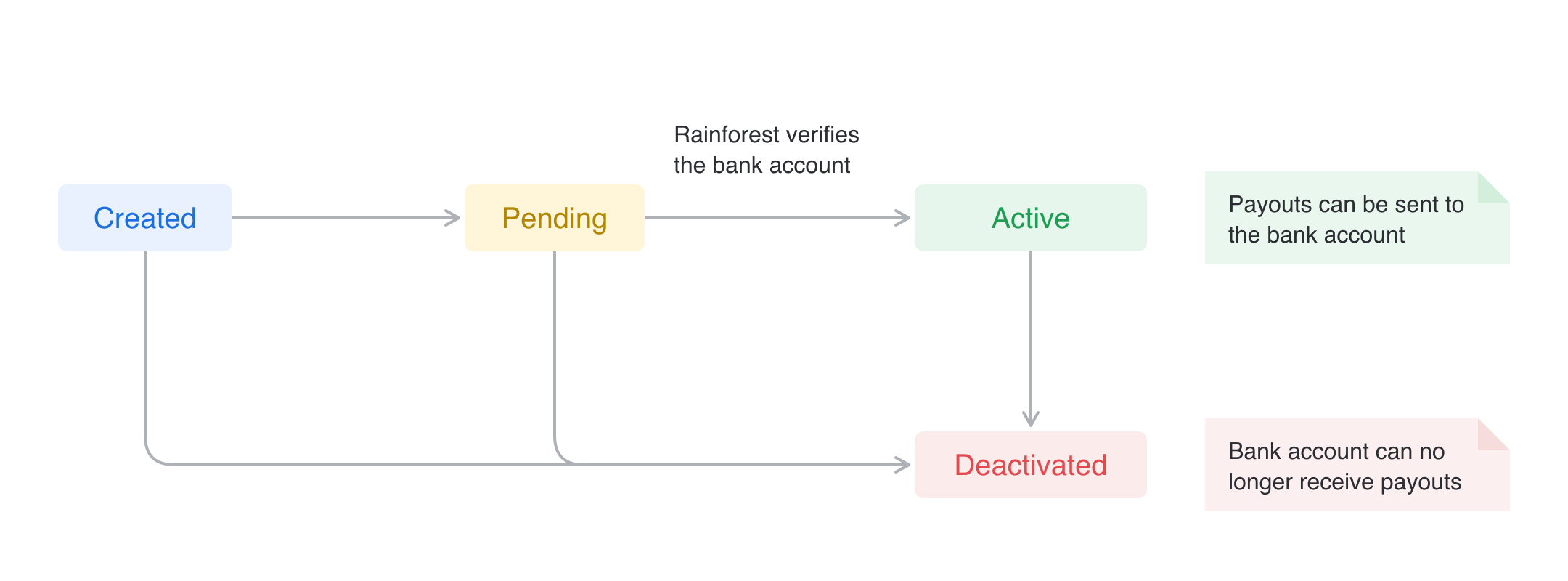
| Status | Description |
|---|---|
CREATED | Bank account was added to the payout receiver and has not been verified yet. Payouts cannot be sent to it. |
PENDING | Bank account is being verified. This is an interim status. |
ACTIVE | Bank account was verified and payouts can be sent to it. |
DEACTIVATED | Bank account can no longer receive payouts. A deactivated bank account cannot be reactivated. |
Add a payout method
A payout method can be added to a payout receiver while they are Needs Information, Needs Method, or Active.
- When the payout receiver is submitted: The method is verified along with the payout receiver when they are submitted.
- After the payout receiver is Active: The method must be verified on its own before payouts can be sent to it. An Active payout receiver stays Active while the new method is verified, and can still be paid to their other active payout methods. A payout receiver in Needs Method moves to Active once the new method is verified.
Default payout method
When a payout receiver has more than one payout method, their first verified method becomes their default when onboarded. Once the payout receiver is Active, the merchant can update the payout receiver's default payout method.
Deactivated payout methods
Rainforest deactivates a payout method when it can no longer receive funds. This happens when a payout is returned with one of the following ACH return codes:
| Code | Description |
|---|---|
| R02 | Account Closed |
| R03 | No Bank Account/Unable to Locate Account |
| R04 | Invalid Account Number |
| R20 | Non-Transaction Account |
A payout returned with any other ACH return code does not deactivate the payout method.
If the payout receiver has another active payout method, then the receiver stays Active and can still be paid to the other payout methods. If the deactivated payout method was their only active method, then the payout receiver moves to Needs Method and cannot be paid until a new bank account is added and verified.
The platform is notified when a payout receiver moves to Needs Method through the payout receiver webhooks. To make the payout receiver eligible for payouts again, the platform needs to bring the merchant, or the payout receiver, back into its experience to add a new payout method, such as with the Payout Receiver Management Component.
Edit a payout receiver
A payout receiver's friendly name, default payout category, and metadata can be updated at any time until they are Declined or Deactivated.
A third-party payout receiver's identity details (legal name, or first and last name) can only be updated while they are in Needs Information, before they are submitted for verification. Once the receiver is Active, if they need to update their identifying information, the receiver will need to onboard as a new receiver.
Deactivate a payout receiver
A payout receiver can be deactivated when the merchant no longer pays them. A Deactivated payout receiver cannot be paid out to and cannot be reactivated.
Sandbox simulation
In Production, Rainforest verifies a third-party payout receiver after they are submitted. In the Sandbox environment, Rainforest does not verify payout receivers, so a submitted payout receiver stays Verifying until their verification is simulated. This allows you to test each verification outcome and the payout receiver webhooks you will receive in Production.
To simulate verification, submit the payout receiver, then call the simulate payout receiver endpoint with the status to move them to. A payout receiver can only be simulated while they are Verifying.
| Status | Result |
|---|---|
ACTIVE | Payout receiver passed verification. Their bank account is verified, and they can be paid. The payout receiver must have a bank account to move to Active. Sends the payout_receiver.active webhook. |
NEEDS_METHOD | Payout receiver passed verification, but their bank account could not be verified. The bank account is deactivated, and the payout receiver cannot be paid until a new bank account is added. Sends the payout_receiver.needs_method webhook. |
DECLINED | Payout receiver did not pass verification and cannot be paid. A reason of up to 255 characters can optionally be provided. Sends the payout_receiver.declined webhook. |
To test adding a new bank account after Needs Method, add a bank account to the payout receiver and verify it. In Sandbox, the new bank account is verified right away, and the payout receiver moves to Active without another simulation.
The merchant's own payout receiver is Active as soon as payouts are enabled, so there is nothing to simulate.
Updated about 4 hours ago