
Fund availability timing
When payments become available to deposit or payout, by payment method type
Every payment a merchant processes becomes available in the merchant's balance on a schedule, called fund availability timing. Once funds are available, they leave the merchant's balance in one of two ways:
- Deposit: Rainforest automatically creates a deposit of all payment activity available on the merchant’s deposit frequency of daily, weekly, or monthly.
- Payout: For merchants enabled for payouts, available funds stay in the merchant's balance until they are paid out or an on-demand deposit is processed.
The timing rules for payment availability are the same for both deposits and payouts. The only difference is what happens once the funds are available.
Fund availability timing is expressed in a "T+X" format, where T equals the processing date of the payin and X equals the number of business days until the payin is available in the merchant's balance. The payin status will move from Processing to Succeeded when it becomes available.
For example: T+1 would indicate that a payin processed on Monday is available on Tuesday. For a merchant on daily deposits, it is deposited on Tuesday. For a merchant on weekly or monthly deposits, it is included in their next scheduled deposit on or after Tuesday. For a merchant on payouts, it can be paid out starting Tuesday.
Fund availability timing
Fund availability timing is set per merchant and per payment method type. Meaning card and ACH payins may have different timings.
Payins
Payin timing is dependent on the type of payment method used to process the payin:
- Card payins
- PayPal payins
- ACH payins
- Validated ACH payins
- Balance-Checked ACH payins
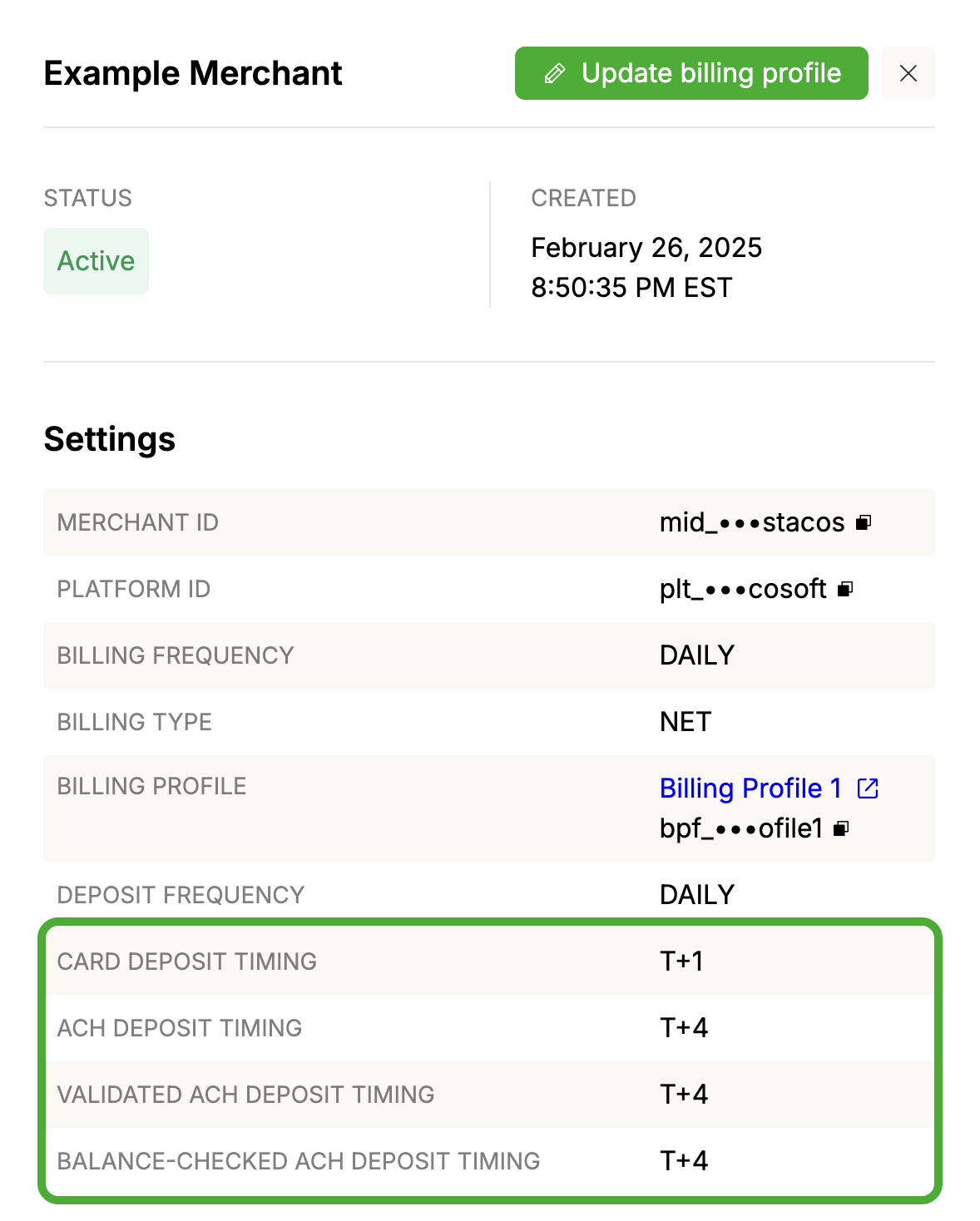
Rainforest's standard timing is T+1 for Card and PayPal payins, and T+4 for ACH payins.
Top-ups are payins, so a top-up follows the timing of the ACH or validated ACH payment method it was processed with.
The merchant's timing can be viewed in the Merchant details in the Rainforest Platform Portal. Timing can vary per platform, please reach out to support for timing configuration.
Other payment types
Payment types that are not payins, such as refunds, chargebacks, and ACH returns, follow a T+1 timing that is not configurable by the platform or merchant. These payment types are generally reversals, so the funds are deducted from the merchant's balance the next business day.
Configuration
A platform has the following configuration per payment method type listed above:
- Default timing
- Minimum timing
When a merchant is onboarded with Rainforest, by default, the merchant will receive the default timing from the platform's configuration. For example, if the platform's default Card timing is T+2, then the merchant's Card timing will be configured to T+2.
The minimum timing can be configured to be less than the default. For example, the platform's minimum Card timing is T+1. They can offer the faster T+1 timing to select merchants.
The platform can override the merchant's default timing in two ways:
- Setting the timing on the Create merchant request
- Updating the timing on an Active merchant with an Update merchant request
The fields to set the configuration are
card_release_delay_dayspaypal_wallet_release_delay_daysvenmo_release_delay_dayspaypal_paylater_release_delay_daysach_release_delay_daysvalidated_ach_release_delay_daysbalance_checked_ach_release_delay_days
They must be set to a value greater than or equal to the platform's minimums per payment method.
Pre-approval RequiredTo learn more about dynamic merchant timing configuration, reach out to your Platform Success Manager or contact support.
Deposits and payouts
Deposits
When a deposit is created depends on the merchant's deposit frequency of daily, weekly, or monthly. A deposit includes all funds that became available since the merchant's last deposit, regardless of the day the payments were processed on.
- Daily: A deposit is created on each US banking day that the merchant has funds available. For example: Card payins on a T+1 timing processed on Friday, Saturday, and Sunday will deposit on Monday in a single deposit.
- Weekly or monthly: Funds that become available between deposits stay in the merchant's balance and are included in the merchant's next scheduled deposit. The platform can also request an on-demand deposit between scheduled deposits, which deposits the merchant's full available balance at the time of the request.
Payouts
For a merchant on payouts, scheduled deposits are turned off. Funds that become available stay in the merchant's available balance until a payout is scheduled. A payout can only draw on funds that are already available; funds from pending payments cannot be paid out.
For example: A card payin on a T+1 timing processed on Monday is available for a payout on Tuesday. A payout created on Tuesday can include those funds, and processes on its scheduled date. See payout timing.
Daily cutoff times
| PAYIN TYPE | DAILY CUTOFF |
|---|---|
| Card | 11:00 PM ET |
| PayPal | 11:00 PM ET |
| ACH | 9:00 PM ET |
Payins submitted after the cutoff time will follow the timing of the next day as T.
For example: A card payin entered at 11:30 p.m. ET on Monday with a T+1 timing setting will follow a timing of Tuesday as T and will be available to the merchant on Wednesday.
Weekends and banking holidays
Card
A card payin processed on a weekend or banking holiday will be available for timing calculations starting on the next business day. T will be the day the payin was processed, even on a weekend or banking holiday. X will begin the next business day after T.
For example: A card payin processed on a Saturday with a T+1 timing setting will be available to the merchant on Monday. T (Saturday) + 1 (Monday)
PayPal
A PayPal payin processed on a weekend or banking holiday will be available for timing calculations starting on the next business day. T will be the day the payin was processed, even on a weekend or banking holiday. X will begin the next business day after T.
For example: A PayPal payin processed on a Saturday with a T+1 timing setting will be available to the merchant on Monday. T (Saturday) + 1 (Monday)
ACH
An ACH payin processed on a weekend or banking holiday will start the "T" calculation on the next business day. T will be the day the payin was processed if it's a banking day, or the next business day if it's a weekend or banking holiday. X will begin the next business day after T.
For example: An ACH payin entered on a Saturday with a T+1 timing setting will be available to the merchant on Tuesday. T (Monday) + 1 (Tuesday)
Void window
ACH payins processed on a weekend can be canceled, or voided, up until 9pm ET on Sunday. If a banking holiday falls on a Monday after a weekend, then the payins processed over the weekend and the banking holiday can be voided up until 9pm ET on the banking holiday.
Timing examples
For a merchant on daily deposits, the available day is the deposit day. For a merchant on weekly or monthly deposits, the funds are included in their next scheduled deposit on or after the available day. For a merchant on payouts, the available day is the first day the funds can be paid out.
T+1 Card Payin
Note: Funds from payments processed on Friday, Saturday, and Sunday are all available on Monday.
| PAYIN PROCESSING DAY (before 11 PM ET) | AVAILABLE DAY |
|---|---|
| Monday | Tuesday |
| Tuesday | Wednesday |
| Wednesday | Thursday |
| Thursday | Friday |
| Friday | Monday |
| Saturday | Monday |
| Sunday | Monday |
T+1 PayPal Payin
Note: Funds from payments processed on Friday, Saturday, and Sunday are all available on Monday.
| PAYIN PROCESSING DAY (before 11 PM ET) | AVAILABLE DAY |
|---|---|
| Monday | Tuesday |
| Tuesday | Wednesday |
| Wednesday | Thursday |
| Thursday | Friday |
| Friday | Monday |
| Saturday | Monday |
| Sunday | Monday |
T+4 ACH Payin
Note: Funds from payments processed on Saturday, Sunday, and Monday are all available on Friday.
| PAYIN PROCESSING DAY (before 9 PM ET) | AVAILABLE DAY |
|---|---|
| Monday | Friday |
| Tuesday | Monday |
| Wednesday | Tuesday |
| Thursday | Wednesday |
| Friday | Thursday |
| Saturday | Friday |
| Sunday | Friday |
Payment expected deposit date
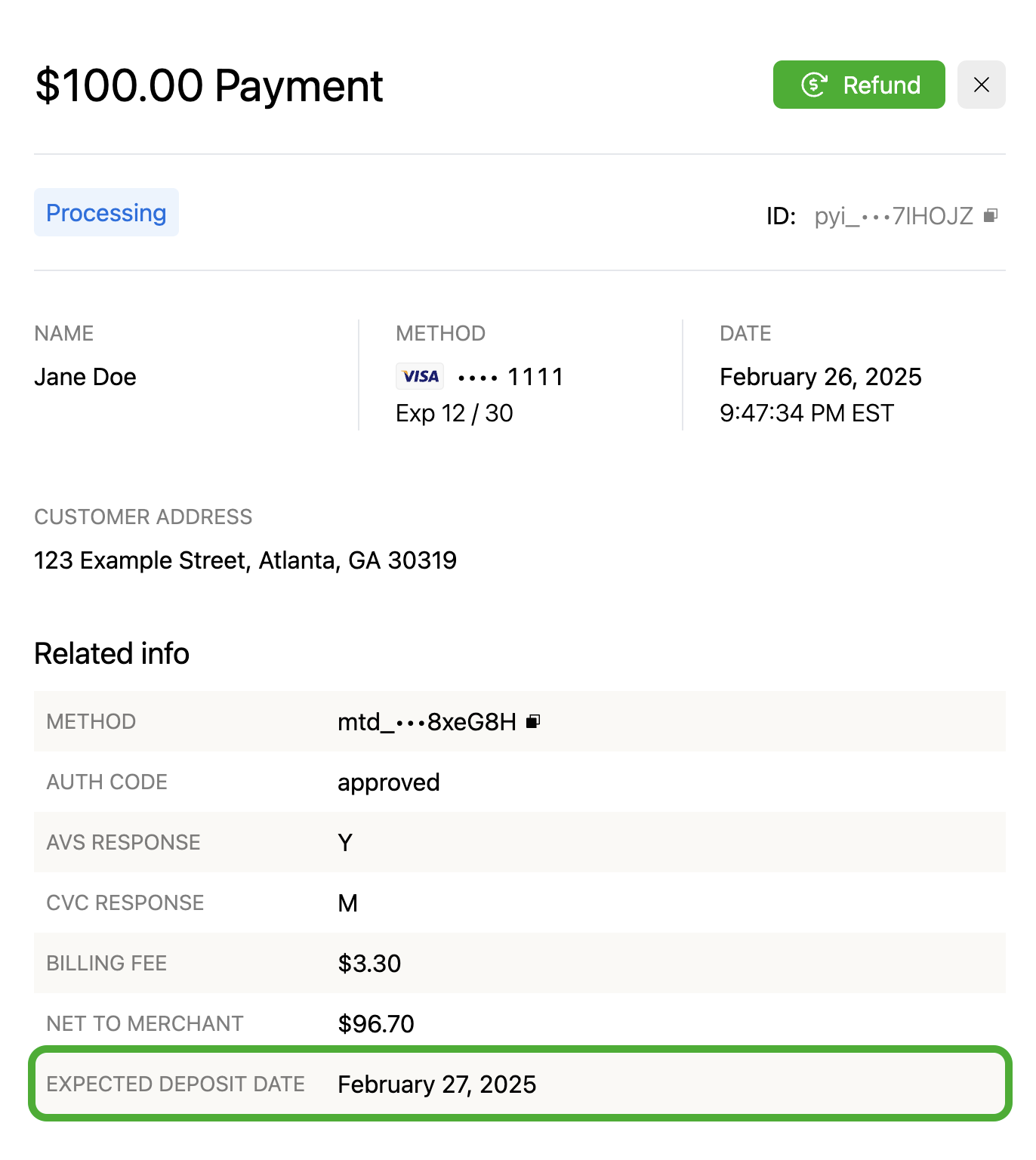
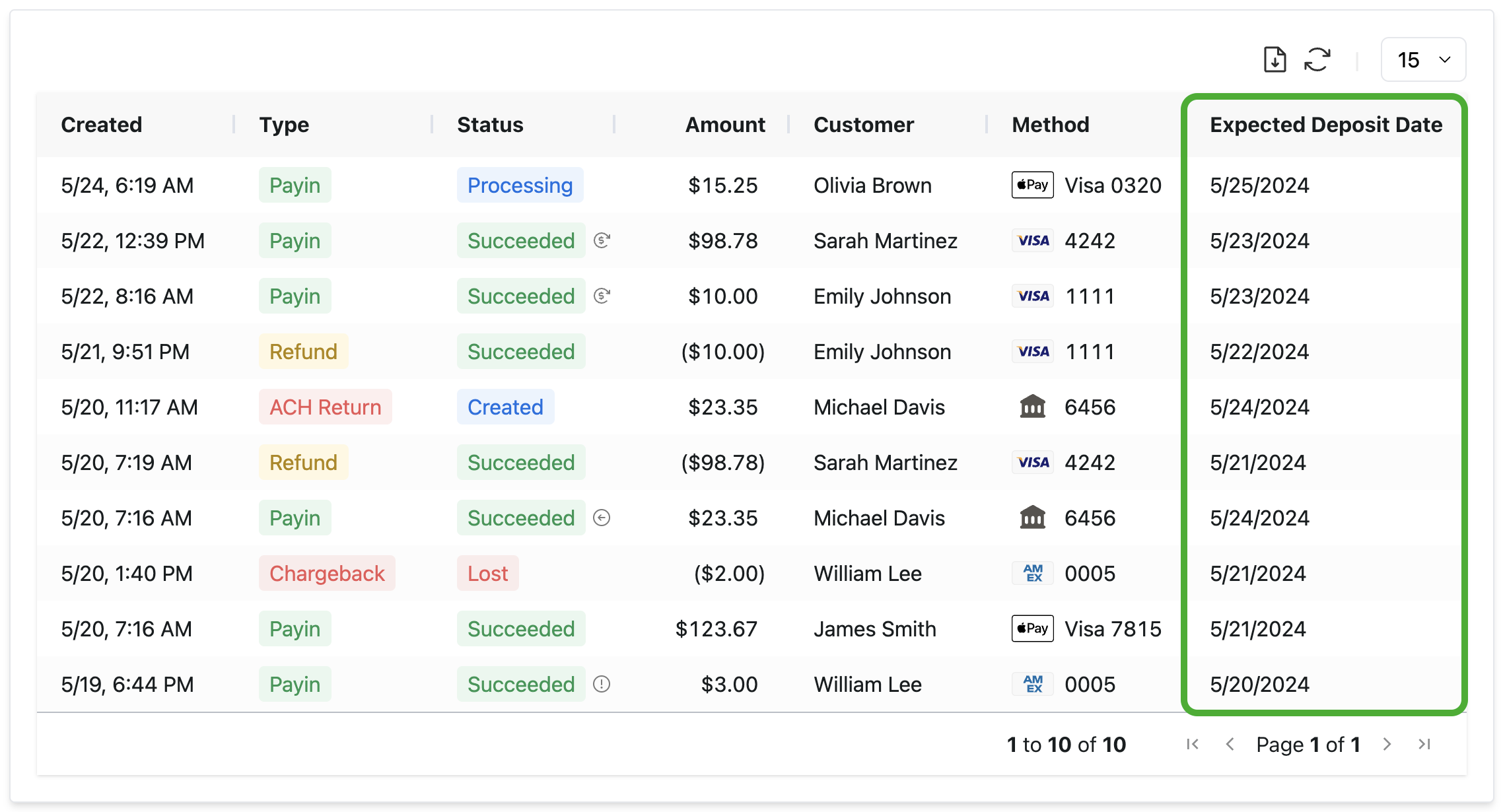
Rainforest provides an Expected Deposit Date for each payment, which represents an estimate of when the payment will be included in the merchant's deposit. For a merchant on payouts, the Expected Deposit Date represents when the payment is expected to be available in the merchant's balance.
There are a few limitations to the Expected Deposit Date:
- This is an expected date and not a guaranteed date. If a payment is in review, canceled, or returned, then the expected deposit date can change.
- If a merchant's deposits are disabled for a reason other than payouts, then this date will not represent the deposit date accurately. This date represents the timing if deposits were enabled.
- For chargebacks, the expected deposit date represents the date the fee of the chargeback is expected to be deducted. Due to the nature of the chargeback lifecycle, funds pulled from the merchant or given to the merchant are dependent on the chargeback status and are not represented by the expected deposit date.
This date will be provided when a payment processes and funds are expected to move following the respective payment type and method's timing.
Expected deposit date populated
The following statuses indicate when the Expected Deposit Date will be available for each type of payment.
| Payment Type | Status | Description |
|---|---|---|
| Payin | Processing | The Expected Deposit Date indicates when the funds will be available to the merchant as long as the payin moves to Succeeded (i.e. is not voided or returned). |
| Refund | Processing | The Expected Deposit Date indicates when the funds will be deducted from the merchant. |
| Chargeback | Created | The Expected Deposit Date indicates when the fee of the chargeback will be deducted from the merchant. Due to the nature of the chargeback lifecycle, funds pulled from the merchant or given to the merchant are dependent on the chargeback status and are not represented by the expected deposit date. |
| ACH Return | Created | The Expected Deposit Date indicates when the funds will be deducted from the merchant. |
Expected deposit date removed
The following payment statuses would have provided an Expected Deposit Date earlier in the lifecycle of the payment. But when the payment is canceled, put in review, or returned, it will no longer be expected to be in a future deposit and the Expected Deposit Date will be updated to reflect this.
| Payment Type | Status | Description |
|---|---|---|
| Payin | Canceled | If the payin is voided, then the funds will not move and the payin is not expected to be in a deposit. |
| Payin | In Review | If the payin is in risk review, the payin will be held until further notice and is not expected to be in a future deposit. |
| Payin | Returned | If the ACH payin is returned before it deposited, the payin's expected deposit date will be updated to account for the ACH return. |
| Refund | Canceled | If the refund is voided, then the funds will not move and the refund is not expected to be in a deposit. |
| Refund | In Review | If the refund is in risk review, the refund will be held until further notice and is not expected to be in a future deposit. |
Components
The Expected Deposit Date is displayed in the respective Payment Details Components.
The Expected Deposit Date can also be configured as a column in the Payment Report Component.
Updated about 8 hours ago