
On-demand merchant payouts
Let merchants pay out their own funds to their bank account when they choose
Early PreviewThis feature is currently in Beta. Please contact Rainforest support or your Platform Success Manager for more information on Payouts.
Feature requirements🔐 Rainforest must enable the platform to access this feature
💲 Billing fees associated to this feature
With on-demand merchant payouts, a merchant pays out funds from their Rainforest balance to their own bank account, choosing how much to send and when, instead of receiving their full available balance on a fixed deposit schedule.
What are on-demand merchant payouts?
An on-demand merchant payout is a payout where the payout receiver is the merchant themselves. With scheduled deposits, Rainforest sweeps the merchant's full available balance to their bank account on a fixed schedule. With on-demand merchant payouts, funds from the merchant's payments stay in their balance until the merchant or your platform decides to pay them out, so the merchant controls how much they receive and when.
On-demand merchant payouts give your platform and your merchants:
- No additional onboarding: The merchant is automatically onboarded as a payout receiver and immediately ready to be paid out.
- Paid to the merchant: The merchant’s bank account provided during merchant onboarding is automatically linked to the merchant’s payout receiver.
- Any amount: The merchant can pay out any amount up to their available balance, leaving the rest to fund later payouts to themselves or to their third-party receivers.
- Any banking day: Payouts can be sent on any valid banking day, so funds can be sent when something happens, such as a job being completed.
- One balance: Payouts draw from the same balance as the merchant’s incoming payments, and additional funds can be added with a top-up.
On-demand merchant payouts vs deposits
A merchant moves funds out of Rainforest through either scheduled deposits or payouts, not both. When a merchant is enabled for payouts, their scheduled deposits are turned off and funds from their payments accrue in their balance until they are paid out.
The biggest difference is what each one is made of. A deposit is a set of payments, so it carries a breakdown of every payin, refund, chargeback, ACH return, and fee it includes. A payout is an amount drawn from the balance as a whole, so it has no per-payment breakdown.
| Deposit | On-demand merchant payout | |
|---|---|---|
| Timing | Automatic, on the merchant's deposit frequency | When the merchant or platform chooses, on any banking day |
| Amount | The merchant's full available balance | Any amount up to the merchant's available balance |
| Breakdown | Every payin, refund, chargeback, ACH return, and fee in the deposit | None, since a payout is an amount from the balance rather than a set of payments |
| Reporting | Deposit Report Component | Payout Report Component and the Payouts tab of the Merchant Account Component |
On-demand deposits
A merchant on on-demand merchant payouts can still receive their full available balance at once. The platform can request an on-demand deposit, which deposits everything in the merchant's available balance to their deposit method.
Because payouts are drawn from the balance rather than from specific payments, the on-demand deposit includes a line item for each payout sent since the merchant's last deposit. Listing those payouts alongside the payments keeps a per-payment breakdown that adds up to the deposit total.
The merchant as a payout receiver
When payouts are enabled on the platform, each merchant is automatically onboarded as their own payout receiver. Rainforest already verified the merchant and their bank account in merchant onboarding, so the merchant does not go through the verification a third-party payout receiver does. They are Active right away, and the bank account they use for deposits is set up as their payout bank account. The merchant must stay Active to be paid out.
Other bank accounts
The merchant can add other bank accounts to pay out to through the Merchant Account Component or the Payout Receiver Management Component, by authenticating into their online bank account through Rainforest's third-party partner, Plaid, or by entering the account and routing numbers.
Changes to the merchant's deposit method are not reflected on their payout receiver. If the merchant updates their deposit method, add the new bank account to their payout receiver before their next payout.
Reporting
On-demand merchant payouts appear in the Payout Report Component and the Payouts tab of the Merchant Account Component, alongside payouts to external payout receivers.
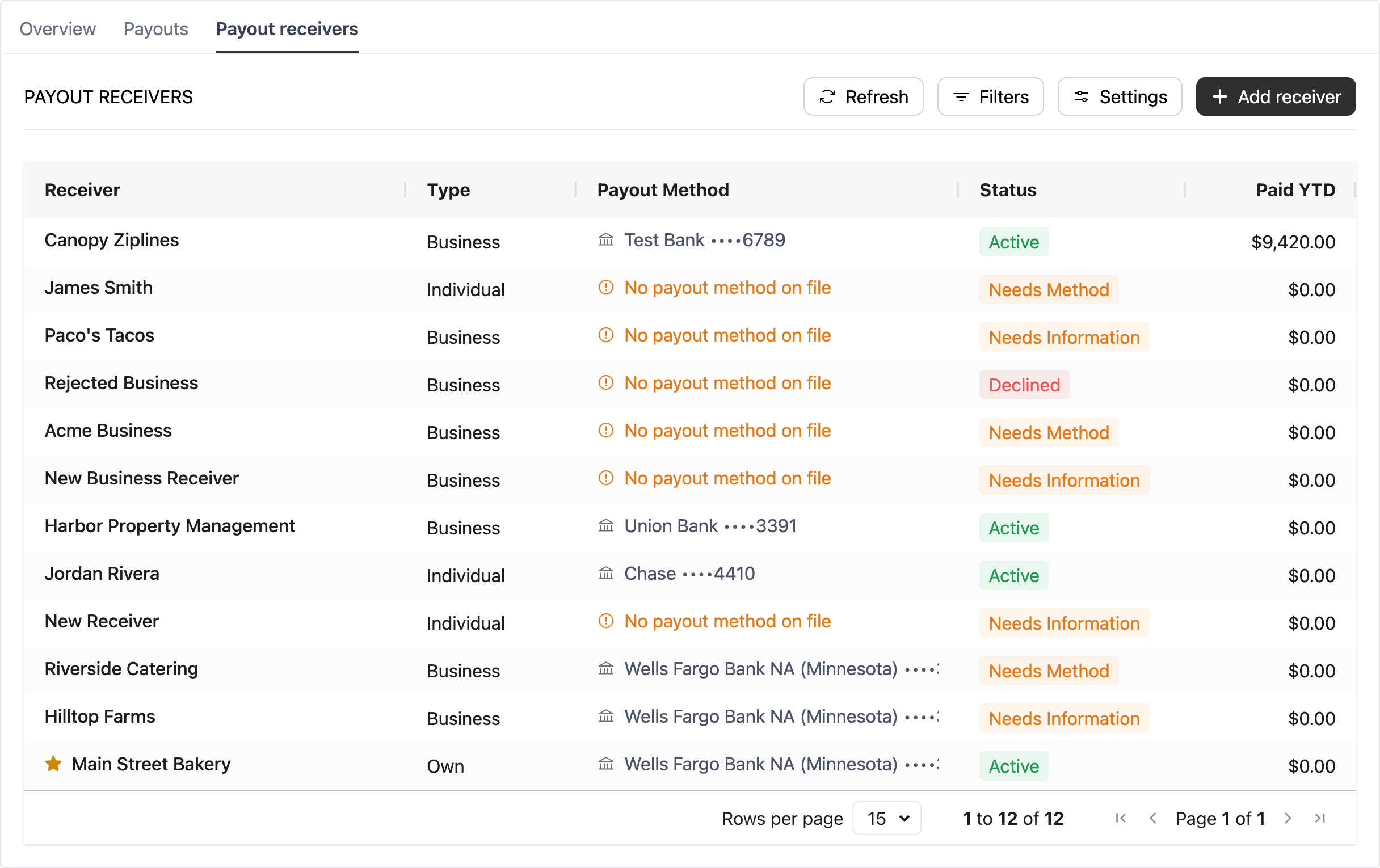
Payout receiver type
The payout receiver type is set to Merchant, which appears as “Own” in the Payout Receivers Report
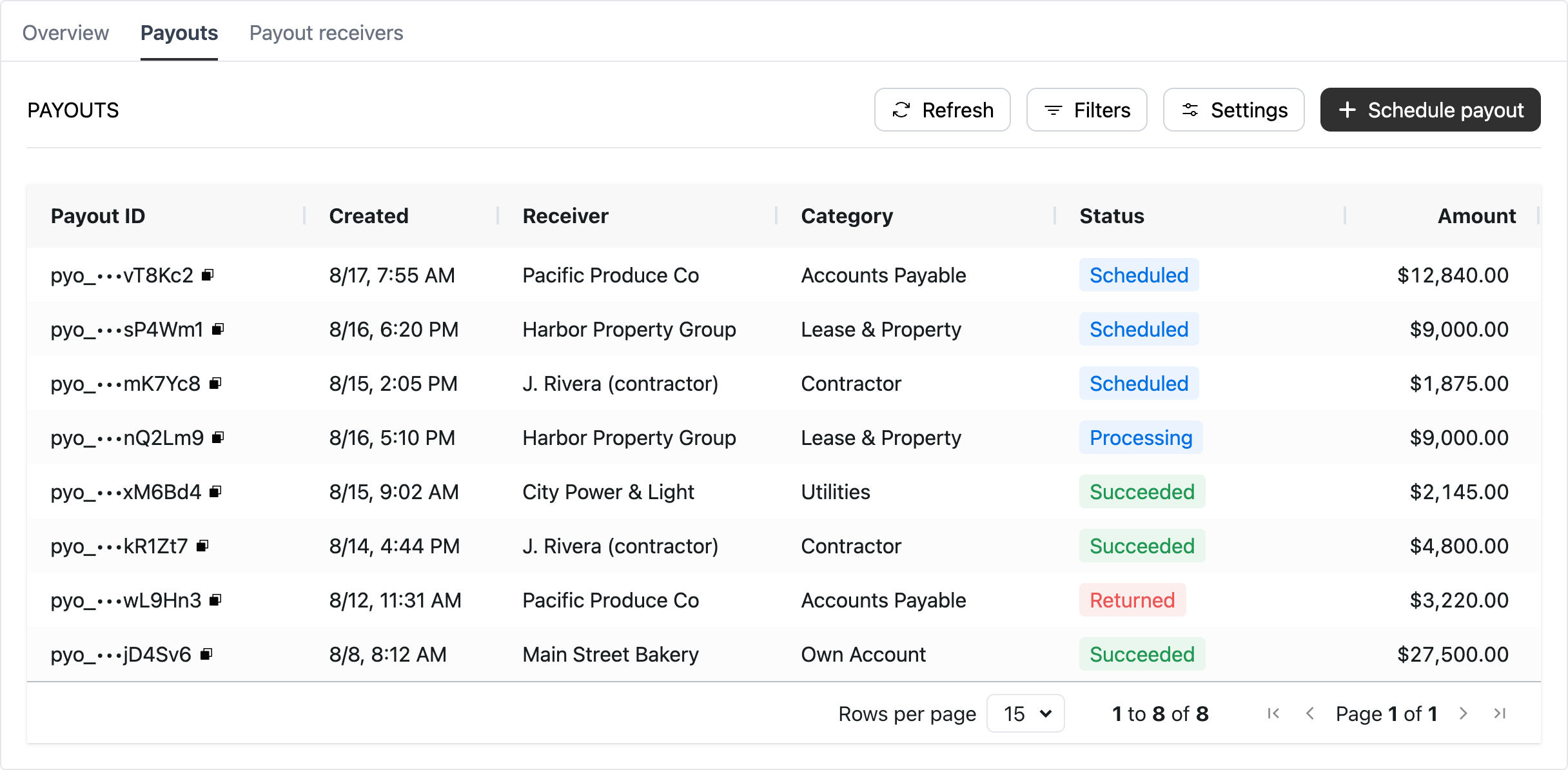
Payout category
The payout category is set to Own Account, which appears in the Payout Report
How to enable
Reach out to your Platform Success Manager to enable payouts for your platform and merchants. When payouts are enabled on the platform, each merchant is automatically onboarded as their own payout receiver, so there is nothing to set up before the merchant's first payout.
Then integrate with one of the payout integration options:
- Components: The merchant schedules payouts to themselves in the Merchant Account Component, the Payout Report Component, or the Payout Schedule Component.
- API: Your platform creates payouts to the merchant's own payout receiver. See Process payouts via API.
Updated about 4 hours ago