
Enable on-demand deposits
Enable on-demand deposits to process deposits
You can implement on-demand deposits in your platform with three steps:
- Request an on-demand deposit for a merchant
- Listen for deposit webhooks to receive the scheduled deposit
- Configure the Deposit Report Component to allow the merchant to cancel them
Request an on-demand deposit
Request an on-demand deposit with the create deposit endpoint by providing the merchant_id. The deposit will be for the merchant's full available balance at the time of the request, so no amount is provided.
Optionally, provide metadata with your own reference for the request. The metadata is returned on the deposit and in the deposit webhooks, so you can reconcile the scheduled deposit back to the request.
curl --location 'https://api.rainforestpay.com/v1/deposits' \
--header 'Content-Type: application/json' \
--header 'Authorization: Bearer {{api_key}}' \
--data '{
    "merchant_id": "REPLACE_ME",
    "metadata": {
        "request_ref": "REPLACE_ME"
    }
}'
A successful request returns a 204 No Content response with no body. Rainforest will process the request and create a deposit in the status of SCHEDULED. A deposit.scheduled webhook will trigger once the deposit is scheduled with the details of the deposit, such as the deposit ID and amount.
Declined requests
Rainforest will ensure that the merchant is eligible for an on-demand deposit when the deposit is requested. A 204 response always means the request was accepted and the deposit is currently being scheduled. If the request is declined, the response will return the reason in the error message.
| Status code | Error message |
|---|---|
400 | merchant_id is required |
400 | Invalid merchant_id |
400 | On-demand deposits cannot be created between 12:00 AM and 1:00 AM ET. |
400 | Merchant must have a positive balance. |
403 | Merchant deposits are disabled |
403 | Merchant is not active |
409 | Merchant has a deposit in the status of SCHEDULED. |
409 | Merchant's next weekly deposit is already scheduled for YYYY-MM-DD. |
Listen for deposit webhooks
On-demand deposits send the same deposit webhooks as any other deposit, along with two new events:
deposit.scheduled- triggered when an on-demand deposit is requested and scheduled. This is the first time your platform receives the deposit ID, amount, and scheduled deposit date.deposit.canceled- triggered when an scheduled on-demand deposit is canceled.
On-demand deposit fields
The following fields are relevant to on-demand deposits.
| Field | Description |
|---|---|
is_on_demand | Set to true when the deposit was created on-demand by the platform via API. Set to false for deposits created on the merchant's configured deposit frequency. |
scheduled_deposit_date | The date the deposit is scheduled to process on, in ISO 8601 format (YYYY-MM-DD). |
scheduled_at | The date and time the deposit was scheduled at, in UTC RFC 3339 format. |
processed_at | The date and time the deposit was processed at, in UTC RFC 3339 format. Set once the deposit status is PROCESSING. |
canceled_at | The date and time the deposit was canceled at, in UTC RFC 3339 format. Set only if the deposit status is CANCELED. |
canceled_by | Who canceled the deposit. Valid values are PLATFORM, MERCHANT, or RAINFOREST. |
cancel_reason | The reason the deposit was canceled. Set only if the deposit status is CANCELED and a reason was provided. |
Cancel an on-demand deposit
Cancel in the API
Cancel a scheduled on-demand deposit with the cancel deposit endpoint and optionally provide a cancel reason of up to 255 characters.
curl --location 'https://api.rainforestpay.com/v1/deposits/{deposit_id}/cancel' \
--header 'Content-Type: application/json' \
--header 'Authorization: Bearer {{api_key}}' \
--data '{
    "cancel_reason": "No longer needed"
}'
The deposit's funds return to the merchant's available balance and will be included in the merchant's next deposit.
An on-demand deposit can be canceled at any time while it is in the status of SCHEDULED.
When the deposit is canceled via the API, the canceled_by is set to PLATFORM. The deposit.canceled webhook is triggered and will include the cancel_reason.
Cancel in the Deposit Report Component
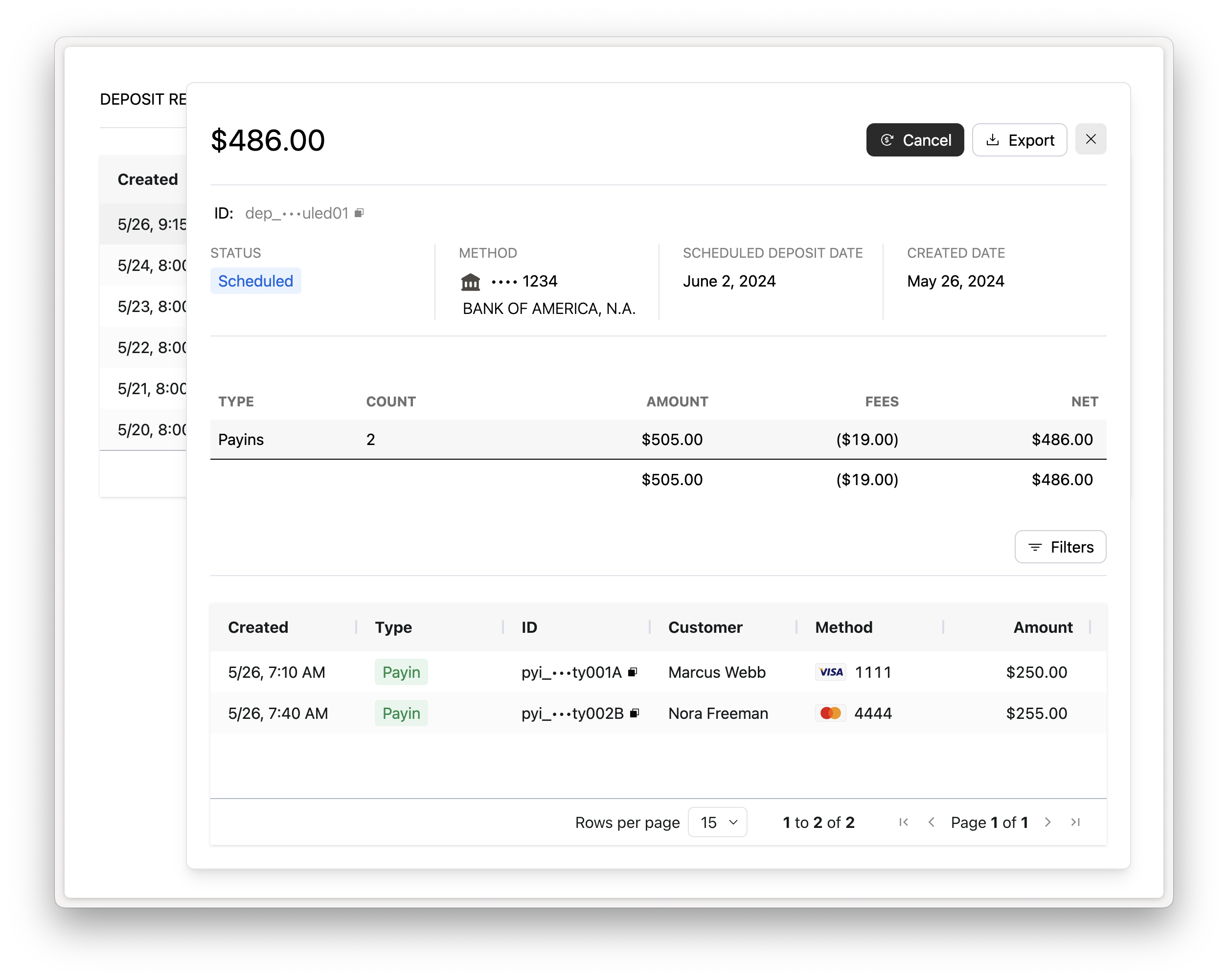
The Deposit Report Component displays on-demand deposits in the status of Scheduled and Canceled.
To let the merchant cancel a scheduled on-demand deposit from the Deposit Report Component, set the allowed-actions attribute to cancel-deposit.
<rainforest-deposit-report
    session-key="REPLACE_ME"
    data-filters='{"merchant_id":"REPLACE_ME"}'
    allowed-actions="cancel-deposit"
></rainforest-deposit-report>
The Cancel button shows only on on-demand deposits in the status of Scheduled.
The session must also include the deposit_report_component.update_deposit permission group:
{
    "ttl": 86400,
    "statements": [
        {
            "permissions": [
                "group#deposit_report_component",
+               "group#deposit_report_component.update_deposit"
            ],
            "constraints": {
                "merchant": {
                    "merchant_id": "REPLACE_ME"
                }
            }
        }
    ]
}
When the deposit is canceled via the Component, the canceled_by is set to MERCHANT. The deposit.canceled webhook is triggered and will include the cancel_reason.
Sandbox simulation
Time does not move in the Rainforest Sandbox environment, so payins and refunds do not succeed and deposits do not process on their configured deposit frequency. Use the simulate endpoint to make payments available for a deposit and simulate the deposit life cycle:
- Process payins for a merchant on a weekly or monthly deposit frequency.
- Transition the merchant's payins to Succeeded with the simulate merchant complete payments endpoint, so they are part of the merchant's available balance.
- Request an on-demand deposit for the merchant through your normal integration. The deposit is created in the status of
SCHEDULEDand thedeposit.scheduledwebhook is sent. - Move the deposit to
PROCESSINGwith the simulate deposit status change endpoint, then toSUCCEEDEDorFAILED. To test canceling instead, cancel the deposit while it isSCHEDULED.
The expected webhooks are sent for the deposit on each status change.
Updated about 15 hours ago