
Payouts
Move money out of Rainforest, on your terms.
Early PreviewThis feature is currently in Beta. Please contact Rainforest support or your Platform Success Manager for more information on Payouts.
Feature requirements🔐 Rainforest must enable the platform to access this feature
💲 Billing fees associated to this feature
In the Rainforest ecosystem, a Payout is the movement of a set amount of funds from a Merchant's balance to a Payout Receiver's bank account. The payout receiver is either the merchant themselves or a third-party business or individual that Rainforest has onboarded and verified. A payout lets the merchant or the platform decide who gets paid, how much to pay them, and when.
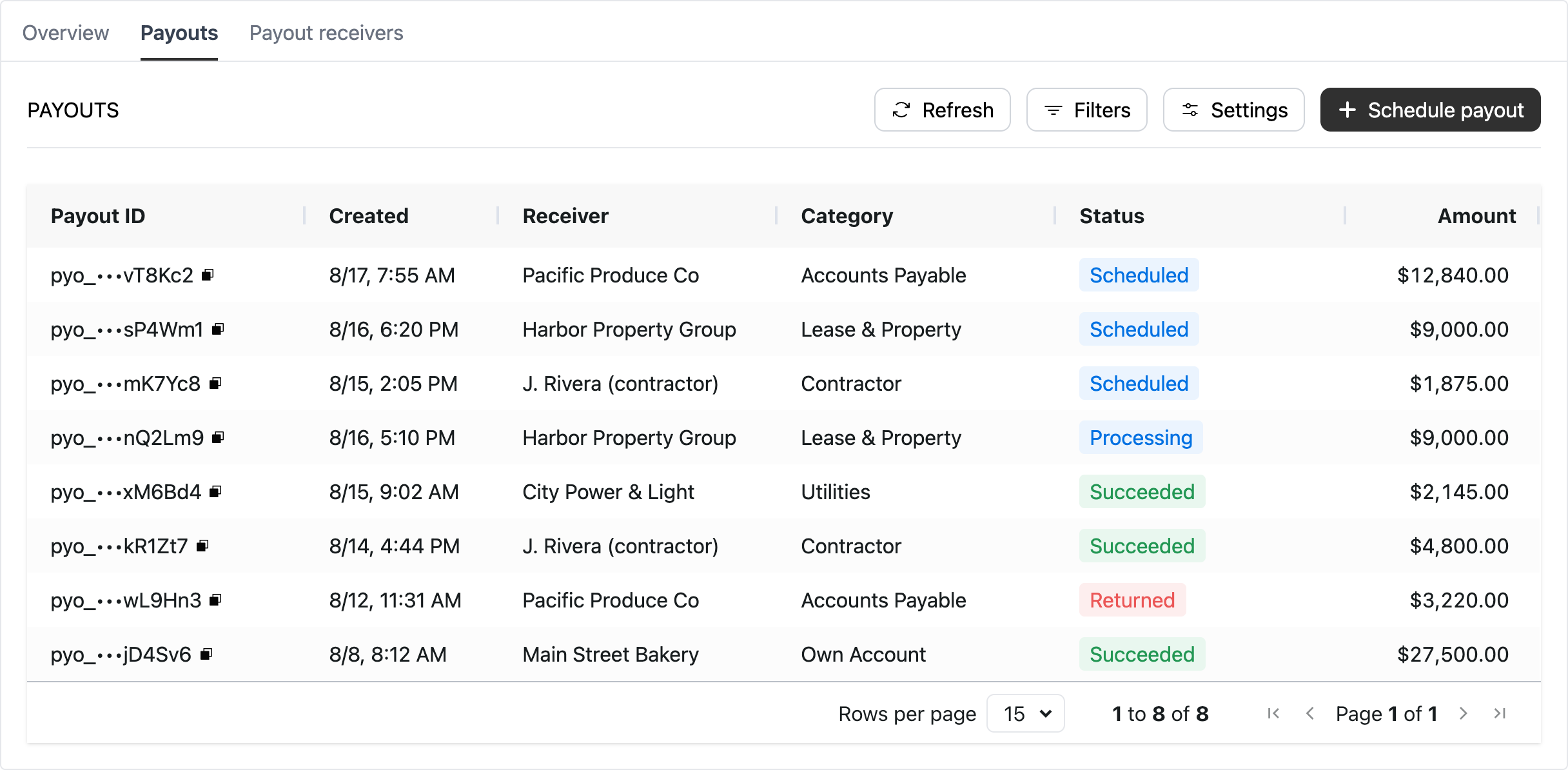
A payout is identified by the payout_id in the Rainforest ecosystem. The prefix for a payout_id is pyo_ on Production and sbx_pyo_ on Sandbox.
Payouts vs deposits
Payouts and deposits both move funds out of a merchant's balance to a bank account, but they work differently.
A deposit sweeps all payment activity making up the merchant's balance that is available to be deposited, on a fixed schedule, to the merchant’s bank account. Because a deposit is made up of payments, each deposit carries a breakdown of every payin, refund, chargeback, ACH return, and fee it contains.
A payout sends a set amount of funds to a payout receiver’s bank account on the date the merchant or platform chooses. The amount is drawn from the merchant’s balance as a whole rather than from specific payments, so a payout has no per-payment breakdown.
| Deposit | Payout | |
|---|---|---|
| Amount | Everything available in the merchant's balance | A set amount chosen when the payout is created |
| Timing | Automatic, on the merchant's deposit frequency. Merchants on weekly or monthly deposits can also receive an on-demand deposit between scheduled deposits. | On the requested payout date |
| Sent to | The merchant's deposit method | A payout receiver: the merchant themselves or a third party |
| Breakdown | Every payment included in the deposit | None, since a payout is an amount from the balance |
| Reporting | Deposit Report Component | Payout Report Component |
A merchant can move funds out of the Rainforest ecosystem through either scheduled deposits or payouts, not both. When a merchant is enabled for payouts, the merchant's scheduled deposits are turned off and funds from payments accrue in the merchant's balance until they are paid out.
A merchant pays their own funds out to themselves with on-demand merchant payouts. A merchant on payouts can also receive their full available balance at once through an on-demand deposit. That deposit includes a line item for each payout sent since the merchant's last deposit, so it keeps a per-payment breakdown that adds up to the deposit total.
Merchant balance
A merchant’s balance consists of:
- Available balance: Funds that can be paid out now. A payment becomes available on the same timing it would be included in a deposit. See fund availability timing.
- Pending payments: Funds from payments that are still processing and cannot be paid out yet.
A payout can only be scheduled if the merchant’s available balance covers the amount of the payout. If the merchant has enough funds, when the payout is scheduled the amount is deducted from the available balance immediately, so another payout cannot spend the same funds.
Payouts do not support advances or overdrafts. A merchant can add funds to their available balance via top-ups.
If a payout is canceled, failed, or returned, the amount goes back to the merchant's available balance.
Payout receivers
Every payout is sent to a payout receiver, which represents who the merchant is paying and the bank account the payout is sent to. A payout receiver is one of:
- The merchant themselves: The merchant pays out their own funds to their own bank account. Each merchant is automatically onboarded as their own payout receiver when payouts are enabled on the platform, and because they are already onboarded and underwritten, they are ready to be paid right away.
- A third-party business or individual: Someone the merchant pays, such as an account payable, contractor, or utilities. Rainforest onboards and verifies the payout receiver before they can be paid.
For how payout receivers are onboarded and verified, see Payout receivers.
Payout timing
When a payout is created, a requested payout date can be set. If it is not, Rainforest schedules the payout for the earliest available date.
Every payout has a scheduled date, which is the date the payout processes. This date can differ from the requested payout date because of two constraints:
- Daily cutoff: The cutoff to schedule a payout to process the next business day is 9:00 PM ET. A payout created after the cutoff can be scheduled for as soon as the business day after that.
- Weekends and banking holidays: Payouts can only be scheduled on banking days. If a payout is requested on a weekend or US banking holiday, Rainforest automatically schedules it for the next available payout date.
Funds can reach the payout receiver as early as the scheduled date, but the exact day depends on their bank, which typically posts within two business days. To give merchants and payout receivers a date they can plan around, each payout includes an estimated arrival date set two business days after the scheduled date.
For example, a payout created on Monday at 3:00 PM ET with no requested payout date is scheduled for Tuesday, with an estimated arrival date of Thursday. Depending on their bank, the payout receiver could see the funds as early as Tuesday.
Payout categories
Each payout has a category describing what it is for:
- Accounts Payable: payouts to suppliers and vendors.
- Contractor: payouts to independent contractors.
- Lease & Property: Rent, property fees, janitorial services, and other property costs.
- Utilities: payouts to utility providers.
- Own Account: payouts the merchant sends to their own bank account. This is the default category when the merchant is their own payout receiver.
- Other: anything that does not fit another category.
Categories appear in payout reporting so merchants can see what they have paid out by category.
Billing fees
Each payout incurs a Payout fee. This fee can be passed onto the merchant via the merchant billing profile, and the platform can override it for individual payouts.
How the payout fee is collected depends on the merchant's billing type:
- Net billing: The payout fee is deducted from the merchant's balance with the payout, so the available balance must cover both the payout amount and the payout fee.
- Gross billing: The payout fee is billed separately in a billing deposit with the merchant's other billing fees, so the available balance only needs to cover the payout amount.
The payout fee is applied when the payout processed. If the payout is canceled or fails before it processes, then the payout fee is not charged. A payout that is returned after it was sent has already been processed, so its payout fee is not refunded.
Statement descriptor
On the payout receiver's bank statement, a payout shows the merchant's DBA (Doing Business As) name and the last 8 characters of the payout ID. The name tells the payout receiver who paid them, and the ID ties the statement line back to the specific payout.
| Type | Statement Descriptor | Example |
|---|---|---|
| Payout | {Merchant DBA Name} {last 8 characters of the payout ID}-x | MERCHANT pQrStUvW-x |
Statuses
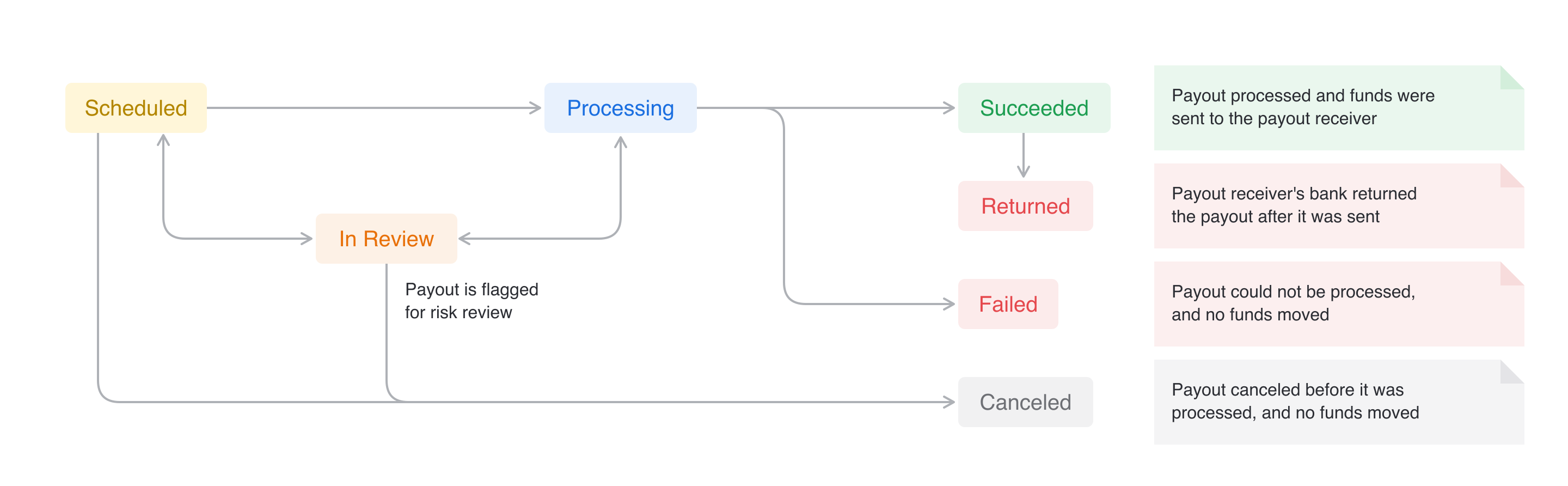
The payout status is the descriptor of the current status in the life cycle of the payout. The platform can be notified of each status change of a payout by subscribing to the payout webhooks.
| Status | Description |
|---|---|
SCHEDULED | Payout was created and is scheduled to process on its scheduled date. The amount, requested payout date, and metadata can be edited, and the payout can be canceled. |
IN_REVIEW | Payout has been flagged for risk review. Funds stay set aside until the review is resolved. |
PROCESSING | Payout is currently processing and can no longer be edited or canceled. This is an interim status. |
SUCCEEDED | Payout has completed processing and the funds were sent to the payout receiver. |
FAILED | Payout could not be processed. No funds moved, and the amount is back in the merchant's available balance. |
RETURNED | Payout was returned by the payout receiver's bank after it was processed. The amount is back in the merchant's available balance. |
CANCELED | Payout was canceled before it was processed, either by the merchant, platform, or after a risk review. No funds moved, and the amount is back in the merchant's available balance. |
In review
When a payout is flagged for risk review, Rainforest moves the payout to the status of In Review. After Rainforest reviews the payout and makes a decision, Rainforest sends a webhook notifying the platform that the payout has moved to a new status of Scheduled, Processing, or Canceled.
In Review to Scheduled
If Rainforest approves the payout before its scheduled date, then the new status will be Scheduled. The following webhooks will trigger in the lifecycle of the review:
payout.scheduledpayout.in_reviewpayout.scheduled
In Review to Processing
If Rainforest approves the payout on its scheduled date, then the payout is processed and the new status will be Processing. The following webhooks will trigger in the lifecycle of the review:
payout.scheduledpayout.in_reviewpayout.processing
In Review to Canceled
If Rainforest reviews the payout and does not approve it, then the new status will be Canceled. The following webhooks will trigger in the lifecycle of the review:
payout.scheduledpayout.in_reviewpayout.canceled
Failed and returned
A payout Fails when it cannot be processed, for example because the payout receiver is no longer active or has no active bank account. The payout will return a Failure Code, explaining why the payout failed. See payout failure codes.
A payout is Returned when the payout receiver's bank rejects it after it was sent. The payout will return an ACH return code, such as R03. If the return code shows that the bank account cannot receive funds (R02, R03, R04, or R20), Rainforest deactivates that bank account on the payout receiver. If the payout receiver has no other active bank account, they move to the status of Needs Method until a new one is added.
In both cases, the payout amount goes back to the merchant's available balance, and a new payout can be created once the cause is resolved. The payout fee is not refunded on a returned payout.
Sandbox simulation
In Production, a merchant's payments move to Succeeded on their fund availability timing, which makes the funds available in the merchant's balance to pay out. Payouts then process on their scheduled date. In the Sandbox environment, payments and payouts do not move on an automatic schedule, which allows you to have more control over testing.
To test payouts in Sandbox:
- Activate the payout receiver. A third-party payout receiver stays Verifying in Sandbox after they are submitted. Move them to Active via the simulate payout receiver endpoint. A merchant paying themselves is already Active.
- Make funds available. Simulate the merchant's payments completing via the simulate merchant complete payments endpoint. This transitions all the merchant's payments with the status of Processing to Succeeded, so the funds are in the merchant's available balance. It does not create a deposit.
- Create the payout. Create the payout the same way your platform does in Production, from the Merchant Account Component, Payout Report Component, Payout Schedule Component, or API.
- Simulate the payout status. Move the payout through its statuses via the simulate payout status endpoint: Processing, Succeeded, Failed with a failure code, Returned with an ACH return code, or Canceled. This allows you to test all webhooks for payouts that you will receive in Production.
This differs from deposits, where one simulation both completes the merchant's payments and creates the deposit, because Rainforest creates deposits on a schedule. Payouts are created by your platform, so only the payments completing needs to be simulated before the payout is created.
Updated about 7 hours ago